Dental Prior Authorization, Automated | Elva
ElvaAI
Elva AI
Login to Workspace Book a Demo
Prior Authorization Management

Secure Approvals for High-Value Cases Without the Wait

Elva automates the entire authorization lifecycle. It identifies procedures requiring approval, compiles the clinical evidence (X-rays, charts, narratives), submits the request, and tracks it daily, so you never have to sit on hold with a payer again.

65%faster approvals
40%less admin work

Auto-Identification

Instantly flags CPT/CDT codes that require Pre-Auth based on the specific payer's rules.

Evidence Compiler

Autonomously pulls the exact Perio Chart, PA X-ray, or Photo required to prove medical necessity.

Status Watchdog

Pings the payer portal daily to check status, alerting you the moment an approval (or denial) drops.

Narrative Generator

Writes clinical narratives using "Gold Standard" keywords that trigger approval algorithms.

THE "OLD WAY" VS. ELVA

The "Fax Black Hole" vs. Digital Transparency

The Old Way (The Black Hole): You fax the request and wait. And wait. You have no idea if they received it, if it’s being reviewed, or if it’s lost. You have to call 3 times just to get a status update, delaying treatment for weeks. The Elva Way (Active Pursuit): Elva submits digitally and tracks the claim like a package. It updates the status in your PMS (e.g., "Sent," "In Review," "Approved") daily. If the payer asks for "More Info," Elva alerts you instantly so you can fix it that same day.

ELVA CHAT INTEGRATION

Don't check the portal. Just ask.

Your team can check the status of a case instantly or ask what is required for a specific submission. Dr. Smith: "What's the status of the Pre-Auth for Sarah Jones' Implant?" @Elva: Status: APPROVED. Received today. Valid through Dec 31st. Note: They approved the Implant (D6010) but denied the Ridge Augmentation (D7953). I have uploaded the approval letter to the Document Center."

"Pending" is Not a Strategy

Waiting 30 days for a letter that might say "Denied" kills your case acceptance. Elva speeds up the clock by submitting a "Perfect Packet" the first time, cutting turnaround time by weeks.

Automated Authorization Workflow

From the moment you diagnose treatment, Elva takes over the paperwork, ensuring you have the "Green Light" before you pick up the scalpel.

01
Automation

One-Click Submission

Elva integrates with major clearinghouses and payer portals. It auto-fills the request forms with patient data, provider NPI, and clinical codes, attaching the required images automatically.

02
Efficiency

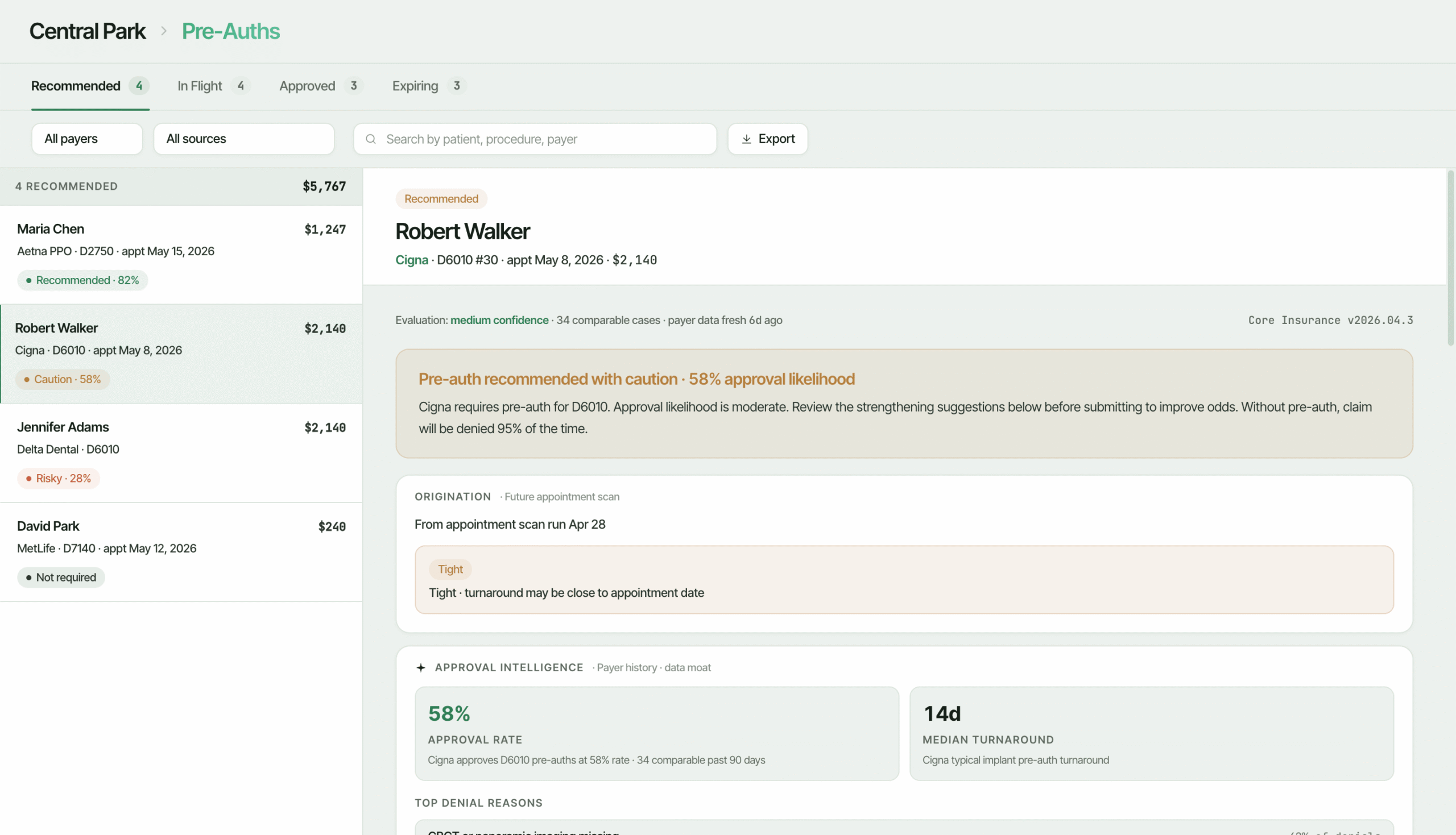
Real-Time Status Dashboard

View all your pending cases in one view. Elva categorizes them by "Submitted," "Action Required," and "Approved," so your team knows exactly which patients are cleared to schedule.

03
Intelligence

Clinical Gap Analysis

Before sending, Elva scans your submission. Missing a perio chart for SRP? Missing a pre-op photo for a crown? Elva flags the missing evidence instantly so you don't get a "Request for More Info" delay 2 weeks later.

04
Communication

Patient "Green Light" Texting

Once approved, Elva can automatically text the patient: "Great news! Your insurance approved your crown. Click here to schedule your appointment." This turns administrative approvals into immediate bookings.

The "Medical Necessity" Proof Engine

Payers look for reasons to deny expensive procedures. Elva knows the exact clinical criteria, from "nerve proximity" to "bone loss measurements", that adjudicators need to see to say "Yes."

Night Guards: The "TMJ" Exclusion

The Risk: You request a Night Guard (D9944) for a grinder. The claim is denied because your narrative mentioned "Jaw Pain," which the payer classifies as a medical (TMJ) exclusion.

Elva's Solution: Elva’s narrative engine strictly avoids "TMJ" keywords. It focuses exclusively on dental pathology: "Appliance necessary to prevent pathologic wear and fractures due to severe nocturnal bruxism," ensuring it stays a dental benefit.

SRP: The "Bone Loss" Standard

The Risk: You request SRP (D4341), but it’s denied because you only attached a Pano, or your charts only show pocket depth without bone loss.

Elva's Solution: Elva acts as a gatekeeper. It refuses to submit the Pre-Auth until a current 6-point perio chart and Bitewings showing bone loss are attached. It knows that a Pano alone is an automatic denial.

Coronectomy: The "Nerve" Proof

The Risk: You plan a Coronectomy (D7251) to avoid nerve damage. The payer denies it, stating "Simple Extraction was sufficient".

Elva's Solution: Elva prompts you to attach a CBCT or PA specifically highlighting the proximity to the inferior alveolar nerve. It generates a narrative emphasizing the "high risk of paresthesia" with standard extraction.

IV Sedation: The "15-Minute" Rule

The Risk: You request Deep Sedation (D9223). It’s denied because "Anxiety" isn't a covered medical indication, or you didn't specify the duration.

Elva's Solution: Elva drafts a narrative citing specific medical necessity (e.g., "Impacted teeth," "Combative behavior," "Complex surgical path"). It ensures the request includes the anticipated duration in 15-minute increments.

CBCT: The "2D Insufficiency" Rule

The Risk: You want a 3D scan (D0367) for an implant. Denied because "Standard X-rays are sufficient".

Elva's Solution: Elva’s submission asserts that 2D imaging was attempted and insufficient. The narrative highlights "proximity to the sinus" or "insufficient bone width" that cannot be diagnosed without 3D imaging.

Ridge Preservation: The "Non-Covered" Flag

The Risk: You pre-auth an Extraction (D7140) and Bone Graft (D7953). The Graft is denied as "Elective/Cosmetic".

Elva's Solution: Elva warns you upfront: "Warning: This plan rarely covers D7953. Expect denial." It allows you to collect the full fee from the patient beforehand, rather than waiting 3 weeks just to be told "No."

TAKE THE NEXT STEP

Get the "Yes" Before You Prep

Stop letting administrative delays bottle-neck your production. Submit perfect Pre-Auth packets that payers can't refuse.