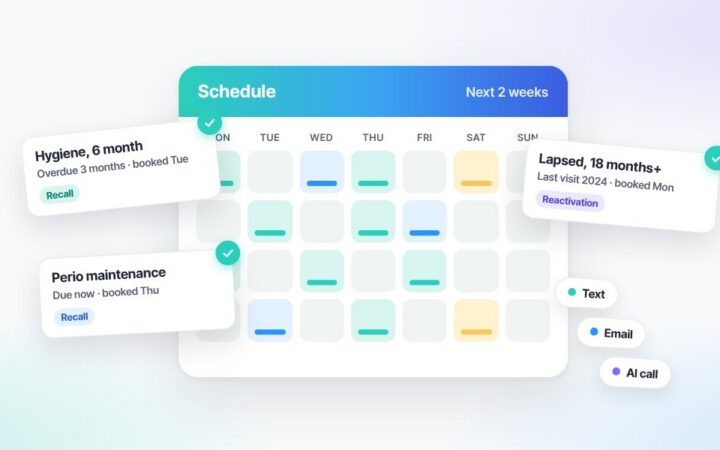
On a plain schedule grid, every appointment looks the same size. The hygiene visit and the full-arch consult get the same cell, the same font, the same nothing-special — and so, on a busy day, they get the same handling. That’s how the most valuable hours on the schedule quietly receive the most generic version of the practice: nobody prepared the case, nobody briefed the coordinator, nobody noticed that the patient also has an expiring benefit and an unscheduled crown from March. Capturing dental treatment opportunities starts with a schedule that knows the difference between appointments — and says so out loud.
Dental Treatment Opportunities: The Big-Case Flag
In ELVA’s calendar, an appointment carrying a treatment plan above a value the practice sets lights up with a big case flag — visible in the cell, days in advance, with the plan’s value shown. The flag isn’t decoration; it’s routing. A big case is supposed to get the practice’s best handling: the prepared case conversation, the right coordinator, the unhurried slot, the team briefed at the morning huddle — none of which can happen if the case looks like a cleaning until the patient sits down. The week view even counts it for you: a “prep needed” KPI tracks how many big cases are coming and what they’re worth, so preparing for them is a scheduled activity, not a scramble.
Dental Treatment Opportunities: Opportunity Windows at the Visit
The second thing a flat grid hides is that a booked patient is the cheapest opportunity in dentistry. They’re here. The seasoned coordinator’s instinct — noticing, while the patient is in the chair, that there’s outstanding treatment, an expiring benefit, or a perfect moment to book the next visit — is exactly what ELVA surfaces as opportunity windows on the appointment itself:
- Walk-in guidance — how to receive this patient: what to know, what to have ready, what today’s visit makes possible.
- Walk-out guidance — what to do before they leave: the unscheduled treatment to raise, the benefit about to expire, the recall that’s due, the next visit to book while they’re standing at the desk.
- Same-day opportunities, totaled — the day’s actionable value across patients shown as a number, so “did we capture today?” has an answer.
- Gaps as opportunities — an opening in the schedule surfaces as something to fill, not just blank space.
Each guidance step is marked by where it came from — a practice guideline from the Clinic Playbook, or an ELVA suggestion — so the team always knows whether they’re following the owner’s rule or weighing a recommendation.
Walk-in to walk-out, instead of walk-out and call later
The difference is mechanical, not motivational. “We should follow up about that crown” after the patient leaves becomes a phone-tag project with a response rate; “I see you have a crown from March we never scheduled — Dr. has an opening Thursday” while they’re at the desk is a calendar entry. The value-capturing instinct that takes years to develop arrives as a concrete prompt at the right moment — which is why it works for the first-week hire too, and why the patients who already trust you enough to be in the building stop leaving with their treatment unscheduled.
This is one layer of a calendar that checks everything, and it’s the schedule-side engine of the case acceptance machine: the conversations happen because the moments stop being missed. See the flags and opportunity windows on the AI dental scheduling calendar page — and where the prepared case goes next on AI treatment plan follow-up.
Frequently Asked Questions
How do you capture dental treatment opportunities on the schedule?
Make the schedule say them out loud: flag high-value cases days in advance so they get prepared handling, surface walk-in and walk-out guidance on each visit (unscheduled treatment, expiring benefits, due recall, next-visit booking), total the day’s actionable value as a number, and present gaps as fillable opportunities rather than blank space.
What is a big case flag?
An automatic marker on any appointment carrying a treatment plan above a value the practice sets — shown in the cell with the plan’s value, days ahead, and counted in a weekly “prep needed” KPI. Its job is routing: making sure the most valuable appointments get the practice’s best handling instead of routine treatment.
What are walk-in and walk-out opportunity windows?
Visit-anchored guidance: walk-in covers how to receive this patient and what today makes possible; walk-out covers what to do before they leave — the treatment to raise, the benefit to mention, the next visit to book at the desk. Each step is marked as either a practice guideline or an ELVA suggestion.
Why act while the patient is in the building?
Because the booked patient is the cheapest opportunity in dentistry. Raising the unscheduled crown at the desk produces a calendar entry; raising it by phone next week produces phone tag. The window is the visit — the system’s job is making sure it’s visible while it’s open.
Who decides what counts as a “big case” or an opportunity?
The practice — the value threshold and what gets surfaced are set in the Clinic Playbook, and every guidance step shows its source, so the team knows the owner’s rules from the system’s suggestions.
Stop letting the grid flatten your day. See what the prepared case becomes: dental case acceptance rate engine.