On this page
Quick answer: Good dental recall scripts name the patient and the practice, say the patient is due, and offer one easy way to book. They leave out treatment details and prices. Use a short live-call script, a voicemail that gives only your name and number, a text with a reply option and an email with a booking link. Change the wording by situation, and stop once the patient says no or opts out.
Only 47% of the U.S. population visited a dentist in 2024, according to the ADA Health Policy Institute (ADA HPI, Sep 2026). Many of the patients who skipped were already on someone’s recall list. The scripts below are written for the front desk to copy, adapt and use today. Replace anything in [brackets].
What every dental recall script needs
Every recall message, in any channel, does five things. If a script misses one, patients either ignore it or call back confused.
- Says who you are. Practice name first, so the message doesn’t read as spam.
- Says why now. “You’re due” or “it’s been a while”, never a diagnosis.
- Gives one next step. A reply, a link or a number. Not all three in one line.
- Leaves out treatment details and prices. Those belong in a conversation with the patient, not in a text or a voicemail.
- Lets the patient say no. A text carries “Reply STOP to opt out.” A call accepts “not now” without pushing.
Keep recall separate from reminders. Recall brings back patients who have no visit booked. Reminders confirm a visit that’s already on the calendar. For confirmation wording, see our dental appointment reminder templates.
Which script to use, by situation
Pick the script by how long it has been since the patient’s last visit and what they still need. For greetings, holds and voicemails outside recall, see dental office phone scripts.
| Situation | Who it covers | Lead channel | Tone |
|---|---|---|---|
| Due now | Hygiene visit due this month, nothing booked | Text, then email | Friendly, routine |
| Overdue 6+ months | Missed the due date by half a year | Text, then phone | Warm, no guilt |
| Lapsed 12–18+ months | No visit in a year or more | Phone, then email | Welcome-back |
| Unscheduled treatment | Doctor recommended a next step, never booked | Phone | Personal, from the doctor’s team |
| Family members | Several people in one household due | Text or phone to the account holder | Practical, one call for all |
Due now: hygiene recall scripts
These are your most frequent messages. Keep them short. The patient already knows you.
Live phone call
“Hi, is this [first name]? This is [staff name] from [practice]. You’re due for your next checkup with us, and I’d like to get it on the calendar. We have [day] at [time] or [day] at [time]. Does either work?”
If neither time works: “No problem. What days are usually easiest for you?”
Voicemail
“Hi, this message is for [first name]. This is [staff name] from [practice]. Please call us back at [phone] when you have a minute. Thanks, and have a great day.”
Keep voicemails to a name and number. HHS guidance says providers may leave messages on answering machines but should limit what they disclose, for example by leaving only a name and number (HHS). You don’t know who else will hear it.
Dental recall text message sample
“Hi [first name], it’s [practice]. You’re due for your next checkup. Book here: [link] or reply with a day that suits you. Reply STOP to opt out.”
Subject: Time to book your next visit, [first name]
Hi [first name],
You’re due for your next checkup at [practice]. You can pick a time that suits you here: [link].
Prefer to talk? Call us at [phone], [office hours].
See you soon,
[Staff name], [practice]
Overdue 6+ months: recall scripts that skip the guilt
A patient who is six months past due usually didn’t decide to leave. Life got busy. Don’t mention how late they are. Make booking feel easy.
Live phone call
“Hi [first name], this is [staff name] from [practice]. We haven’t seen you in a while, and we’d love to get you back in. I can look at early mornings or late afternoons if that’s easier. What usually works for you?”
Voicemail
“Hi, this message is for [first name]. This is [staff name] from [practice]. Please give us a call at [phone]. We’re here until [time] today.”
Text
“Hi [first name], it’s [practice]. It’s been a while and we’d love to see you. We have openings this week and next: [link]. Or reply and we’ll find a time. Reply STOP to opt out.”
Subject: We saved a few times for you, [first name]
Hi [first name],
It’s been a while since your last visit at [practice]. We’d love to see you again. Here are a few open times: [link]. If none of them work, reply to this email with what does.
[Staff name], [practice], [phone]
Lapsed 12–18+ months: reactivation scripts
After a year or more, the patient may have moved, changed insurance or found another dentist. The script’s job is to find out which, politely, and welcome them back if they’re still yours. For the full process, read our guide on how to reactivate dental patients.
Live phone call
“Hi [first name], this is [staff name] from [practice]. It’s been a while since we’ve seen you, and I wanted to check in. Are you still looking for a dental home with us? If anything has changed, like your insurance or your schedule, I can update it now and find a time that fits.”
If they’ve moved on: “Thanks for letting me know. I’ll update our records so we don’t keep calling. You’re always welcome back.”
Voicemail
“Hi, this message is for [first name]. This is [staff name] from [practice]. Please call us back at [phone]. Thank you.”
Text
“Hi [first name], it’s [practice]. It’s been a while! If you’d like to come back, we’d love to see you: [link]. If you’ve moved on, just reply and we’ll update our list. Reply STOP to opt out.”
Subject: Welcome back to [practice]
Hi [first name],
It’s been over a year since your last visit, and we wanted to check in. If you’d like to come back, you can book here: [link]. If your insurance or contact details have changed, reply and we’ll update them before your visit.
If you now see another dentist, let us know and we’ll stop reaching out.
[Staff name], [practice], [phone]
Unscheduled treatment: follow-up scripts
These patients were in the chair recently, and the doctor recommended a next step they never booked. Call them, and keep the details for the conversation itself, once you know you’re speaking to the patient. In texts, emails and voicemails, don’t name the procedure or the cost.
Live phone call (after confirming you’re speaking with the patient)
“Hi [first name], this is [staff name] from Dr. [last name]’s office. The doctor asked us to follow up on the next step you talked about at your last visit. Do you have any questions I can answer, or would you like to find a time?”
Voicemail
“Hi, this message is for [first name]. This is [staff name] from Dr. [last name]’s office at [practice]. Please call us back at [phone].”
Text
“Hi [first name], it’s [practice]. Dr. [last name] asked us to check in about your next visit. Call [phone] or reply here and we’ll find a time. Reply STOP to opt out.”
Subject: Following up from your last visit
Hi [first name],
Dr. [last name] asked us to follow up on the next step you discussed at your last visit. If you have questions, call us at [phone] and we’ll walk you through it. When you’re ready, you can book here: [link].
[Staff name], [practice]
Family members: one call for the whole household
When several people in a family are due, call the account holder once and book everyone. Only discuss the family members that person is allowed to schedule for, such as a parent booking for their children.
Live phone call
“Hi [first name], this is [staff name] from [practice]. You and [child’s first name] are both due for your next checkups. Would it help to book you back to back on the same day? I have [day] at [time].”
Voicemail
“Hi, this message is for [first name]. This is [staff name] from [practice]. Please call us at [phone] about scheduling. Thanks.”
Text
“Hi [first name], it’s [practice]. A few members of your family are due for checkups. Want us to book everyone on the same day? Reply YES and we’ll call with times. Reply STOP to opt out.”
Subject: Booking your family’s next visits
Hi [first name],
Several members of your family are due for their next checkups at [practice]. We can book everyone back to back so it’s one trip. Reply with the days that work, or call [phone].
[Staff name], [practice]
Recall phone script for objections: cost, busy, fear
Most recall calls stall on one of three objections. Acknowledge it, offer one practical fix and leave the door open. Don’t argue and don’t quote prices on the spot.
| The patient says | What to say | Why it works |
|---|---|---|
| “I can’t afford it right now.” | “I understand. Would it help if we check what your plan covers before you come in, so you know ahead of time? We can also talk through payment options when you visit.” | Moves the cost question to a real answer, not a guess on the phone |
| “I’m too busy.” | “Totally fair. We have [early morning / lunch / late afternoon / Saturday] times. Would one of those be easier? I can also book a few weeks out.” | Gives choices that fit a busy week |
| “I get nervous at the dentist.” | “Thanks for telling me. Lots of patients feel that way. I’ll add a note so the team knows, and you can tell the hygienist anything that makes it easier.” | Takes the worry seriously without giving clinical advice |
| “I’ll call you back.” | “Of course. Can I send you a text with the booking link so it’s handy?” | Leaves a next step in their hands |
| “I’ve found another dentist.” | “Thanks for letting me know. I’ll update our records. You’re always welcome back.” | Ends the sequence cleanly and keeps goodwill |
When to stop contacting a patient
A recall sequence needs a clear end. Stop, or pause, in these cases:
- The patient opts out. STOP, unsubscribe, “don’t text me” or the same request on the phone ends that channel. Under FCC rules in effect since April 2025, a patient’s request to stop must be honored within 10 business days. Amendments that take effect on 25 November 2026 let a practice apply an opt-out from one kind of informational message, such as recall texts, to that kind only (FCC order, Federal Register). Process it the same day.
- The patient says they’ve moved on. Update the record and close the recall.
- The sequence runs out without a reply. Most practices end with a final call from the team. After that, mark the patient inactive and revisit them in your next reactivation run.
- A number or email bounces. Fix the contact details before the next attempt, and don’t keep calling a wrong number.
- Too many messages in a short window. Set a cap on how many messages one patient gets in a given period, across every reason you contact them, so recall doesn’t pile on top of reminders and billing.
This is general information, not legal advice. Check consent and opt-out rules for your state with your own adviser.
Dental scripts for recall work best on a schedule
Scripts help only if someone sends them on time, in order, and records what happened. That’s where most offices slip, because recall calls get pushed behind check-ins and phones.
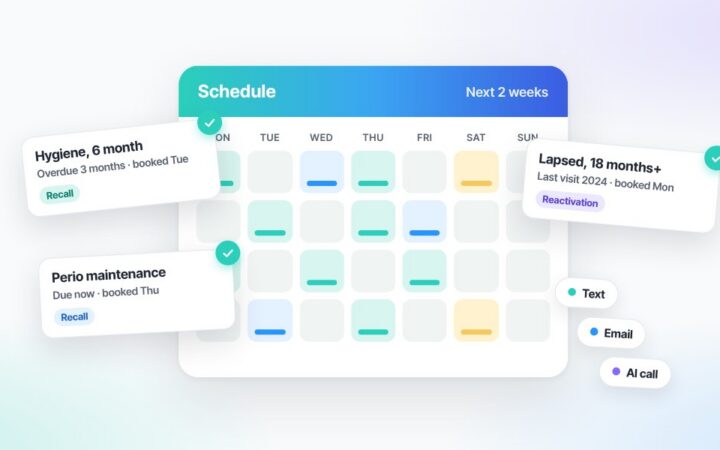
Dental recall software like Elva runs the sequence for you. With Elva’s hygiene recall, every patient due for a cleaning hears from you the day they’re due: by default a text, then an email on day 5, an AI call on day 12 and a call from your team on day 21. Patients who haven’t visited in 18 months or more get a win-back sequence: a text, an email on day 7, an AI call on day 14 and a team call on day 28.
A few rules keep it in line with the scripts above:
- Nothing is sent until you press Start. You review the wording first.
- A shared contact cap. About six texts every two weeks per phone number, fewer for patients who haven’t visited in a while, shared by every agent.
- Team calls land in the Triage Inbox, with who to call, why, and what the patient has already been sent.
- Anything clinical goes to your team.
- AI calls need the Elva AI Receptionist. Without it, recall runs on text and email.
Elva works with major PMSs, including Dentrix, Dentrix Ascend, Open Dental, Eaglesoft, Curve Dental, Denticon and CareStack. Don’t see your PMS? Contact us. Elva is HIPAA compliant and signs a BAA with every practice.
Comparing tools? Our shortlist of the best dental recall software sets out the criteria.
Book a demo to see Elva’s recall sequences running in your PMS.
Frequently asked questions
What should dental recall scripts say?
Your name and practice, that the patient is due, and one easy way to book: a reply, a link or a number. Leave treatment details and prices out of texts, emails and voicemails. On a live call, offer two specific times instead of asking “when are you free?”
What should a dental recall phone script say on voicemail?
Only the patient’s first name, your name, the practice and a callback number. HHS guidance says providers may leave messages but should limit what they disclose, because someone else may hear it.
How many times should you contact an overdue dental patient?
Set a fixed sequence across channels, such as a text, an email, an automated call and a final call from your team, then mark the patient inactive if there’s no reply. Stop at once if the patient opts out.
Should recall texts mention cost or insurance?
No. Keep prices and treatment details out of recall texts and emails. If the patient raises cost, offer to check their plan before the visit and discuss payment options in person.
What’s the difference between a recall message and an appointment reminder?
A recall message asks a patient with no visit booked to schedule one. An appointment reminder confirms a visit that’s already booked. Use different wording and send them from separate sequences.