On this page
Quick answer: A dental insurance aging report lists every unpaid insurance claim by how long it has been open, usually in 30-day groups. To work it, run it for insurance only, start with the oldest and largest claims, check the status of each one with the payer, then fix and resend, appeal, or bill the patient. Write a note on every claim you touch, and run the report again on a set day every week.
The aging report is where unpaid insurance money sits until someone goes looking. Most practice systems can produce it in a minute. Working it is the slow part: each line is a status check, and often a portal visit or a call.
What a dental insurance aging report shows
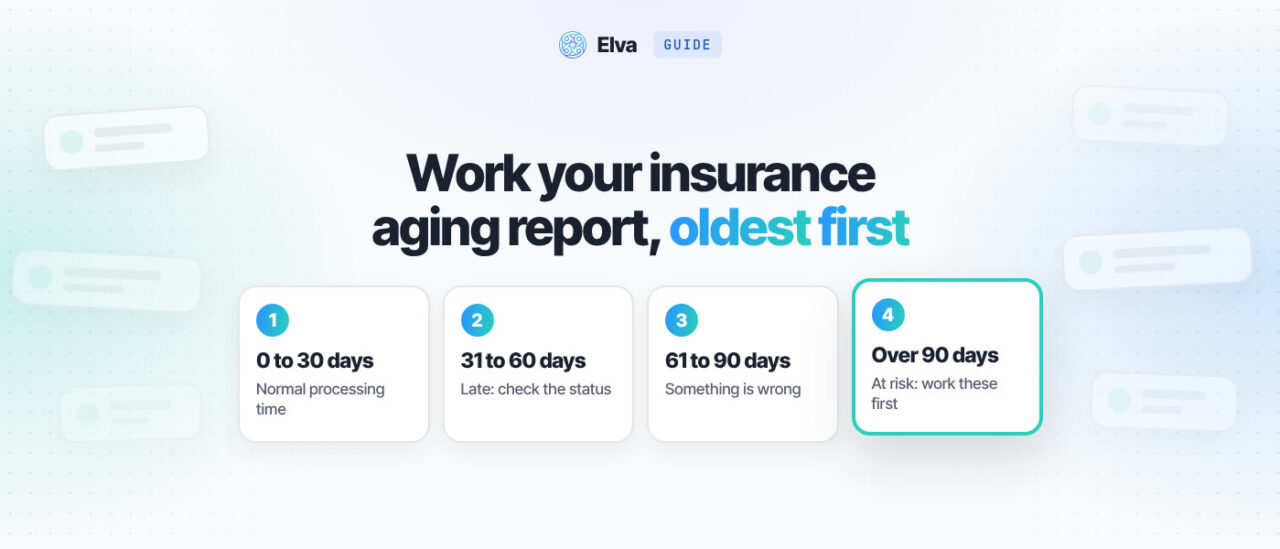
The report groups unpaid claims by age, counted from the date of service or the date the claim was sent, depending on your practice system:
| Group | What it usually means |
|---|---|
| 0 to 30 days | Normal. Most claims are still inside the payer’s processing time. |
| 31 to 60 days | Late for most payers. Check the status. |
| 61 to 90 days | Something is wrong: the claim was not received, was rejected, or is waiting for information. |
| Over 90 days | At risk. Filing and appeal deadlines may be close. |
Keep the insurance aging report separate from patient balances. They are different money, chased in different ways.
What a healthy report looks like
There is no official standard, so treat these as reference points and track your own trend:
- The Academy of General Dentistry has published a target of total accounts receivable below one month of average production.1
- A consultant writing in DentistryIQ in 2026 puts the target for insurance claims older than 90 days at under 20% of insurance receivables.2
The more useful number is your own, measured the same way each month.
How to work the aging report, step by step
1. Run it for insurance only, sorted by payer
Sorting by payer lets you handle several claims in one portal session or one call.
2. Start with the oldest and the largest
Claims over 90 days come first, because their deadlines are closest. Within each group, work the largest balances first.
3. Check the status of each claim
Use the payer’s portal or an electronic claim status inquiry before you pick up the phone. In the 2024 CAQH Index, a claim status inquiry handled by hand cost dental providers $12.01 on average, against $3.71 for an electronic one, and only 28% of dental claim status inquiries were fully electronic.3
4. Sort each claim into one of five answers
- Paid. The payment arrived and was not posted, or was posted to the wrong claim. Post it.
- In process. The payer has it. Note the date and check again later.
- Not received. Resend it, and keep proof.
- Rejected or waiting for information. Send what is missing: an x-ray, a narrative, the primary plan’s EOB.
- Denied or paid short. Decide whether to correct and resend, appeal, or bill the patient.
5. Act the same day
A claim that is checked and then left for next week has to be checked again. Resend, attach or appeal while the answer is in front of you.
6. Write a note on the claim
Record who you spoke to or what the portal showed, the date, the reference number, and the next step. The next person to open the claim should not have to repeat the call.
7. Watch the deadlines
Plans set their own filing and appeal deadlines. For appeals, the American Dental Association advises following the plan’s written process and deadlines and using every level of appeal available.4
8. Run it again on the same day every week
A weekly pass keeps the 31-to-60 group from turning into the over-90 group.
Why claims end up on the aging report
When the same reason keeps appearing, fix the cause and not only the claim:
- The claim never reached the payer.
- An attachment or narrative was missing.
- The patient has two plans, and the secondary is waiting for the primary’s EOB.
- The patient’s coverage or subscriber details were wrong.
- The payment arrived and was never posted.
Several of these start before the claim is sent. Our guide on how to reduce dental claim denials covers the front-desk causes.
How to keep the report short
- Verify coverage before the visit, so the claim goes to the right plan with the right details.
- Send claims with their attachments the first time.
- Post payments the day they arrive. A denial is only found when the payment is read.
- Follow up at each payer’s own pace. A fixed 30-day check is too early for some payers and too late for others.
Where Elva fits
Elva reads the open claims in your practice system and watches each one against how long that payer usually takes, learned from your own claims. Once a claim passes that time, Elva checks its status, signs in to the payer’s portal itself, and calls the payer when the portal does not have the answer. It sorts each claim as paid, in process, not found, denied or rejected, acts on it where it can, and writes what it found into the claim. A claim it cannot settle comes to your team with every try shown.
So the work the aging report asks of your team each week is already under way. See dental claim follow up software.
FAQ
What is a dental insurance aging report?
It is the report in your practice system that lists unpaid insurance claims by how long they have been open, usually in groups of 0 to 30, 31 to 60, 61 to 90 and over 90 days.
How often should a dental office work the insurance aging report?
Every week, on a set day. A weekly pass catches a late claim while it is 31 to 60 days old, when it is still easy to fix.
Which claims should you work first on an aging report?
The oldest first, because their filing and appeal deadlines are closest, and within each age group the largest balances first.
What is a good percentage of insurance claims over 90 days?
There is no official standard. One consultant writing in DentistryIQ in 2026 puts the target at under 20% of insurance receivables. Track your own percentage each month and watch the trend.
What is the difference between an insurance aging report and a patient aging report?
The insurance aging report lists what insurers owe on claims you have sent. The patient aging report lists what patients owe. Work them separately.
Can working the aging report be automated?
Much of it can. Software can check the status of each open claim, visit payer portals, call payers and write notes into the claim, and hand your team only the claims that need a decision.
Related: dental revenue cycle management · dental revenue leakage · how to catch insurance underpayments
1 Academy of General Dentistry, practice management article, 2017. agd.org
2 DentistryIQ, consultant-authored article on dental revenue cycle benchmarks, October 2026. dentistryiq.com
3 CAQH, 2024 CAQH Index (2023 data), dental section. caqh.org
4 American Dental Association, “Responding to Claim Rejections” (ADA staff). ada.org