Every dental practice runs a financial process behind the clinical one — and how well that process works determines whether the care a practice delivers actually turns into money in the bank, or quietly leaks away in denied claims and unworked balances. This guide walks through what dental revenue cycle management actually covers, the full workflow from scheduling to final payment, the KPIs worth tracking, and where most practices lose revenue without realizing it.
Dental revenue cycle management (RCM) is the end-to-end process a dental practice uses to manage revenue from patient scheduling and insurance verification through treatment documentation, claims, payment posting, denial management, and patient collections. Unlike dental billing, which mainly covers submitting claims and posting the payments that come back, RCM spans the entire financial lifecycle of a patient account — including the front-end steps that determine whether a claim is clean before it’s ever filed.
Key takeaways
- Dental RCM covers the full financial lifecycle of a patient account — scheduling to final payment — not just the billing stage inside it.
- The cycle runs in three phases: front-end (scheduling, registration, insurance verification), mid-cycle (documentation, coding, claim submission), and back-end (payment posting, denial management, A/R follow-up) — each covered in detail below.
- Four KPIs give the clearest read on RCM health: days in A/R, denial rate, net collection rate, and clean claim rate — benchmarks vary by practice, so track your own trend, not just a universal target.
- What “good RCM” looks like changes with practice size — a solo practice and a 10-location DSO are managing the same cycle under very different constraints.
On this page: What Is Dental RCM · Dental RCM vs. Dental Billing · The 8-Step RCM Process · KPIs & Benchmarks · Where Revenue Is Lost · RCM by Practice Size · In-House vs. Outsourced vs. Automated · How to Improve Dental RCM · Glossary · FAQ
This guide covers the concepts; for how Elva’s dental RCM software puts them into practice across the full workflow, see the insurance suite.
What Is Dental Revenue Cycle Management (RCM)?
Dental RCM includes patient scheduling, registration, insurance eligibility and benefits verification, treatment documentation, CDT coding, claim scrubbing and submission, payment posting, denial management, accounts receivable follow-up, and patient collections. Each stage feeds the next — a gap in one creates a problem several stages downstream.
Why Dental RCM Matters
The relationship is straightforward but easy to lose sight of day to day: patient visit → documentation → claim → reimbursement → patient payment → cash flow. Every stage in between exists to keep that chain intact. A scheduling error introduces bad data at the start; a missed verification lets a lapsed policy through; a coding mismatch produces a claim that gets denied; an unworked denial becomes a write-off. None of these failures happen in isolation — they compound, which is exactly why RCM is managed as one connected system rather than a series of disconnected tasks.
How Dental RCM Differs from Medical RCM
Dental RCM shares its basic structure with medical RCM but runs on different rules. Dental claims use CDT codes rather than CPT/HCPCS, dental plans commonly apply annual maximums and procedure frequency limitations that most medical plans don’t, coordination of benefits comes up more often when patients carry dual coverage, and dental claims frequently need supporting attachments — radiographs, perio charts, clinical narratives — that medical claims don’t require in the same way. Patient financial responsibility also tends to run higher in dental care, since many procedures fall outside what a plan’s annual maximum will fully cover.
Dental RCM vs. Dental Billing: Key Differences
Billing is one stage inside RCM, not a synonym for it. Billing covers submitting a claim and posting the payment that comes back — a reactive function that happens after care is delivered. RCM is the broader system around it: the scheduling accuracy that keeps a claim from being wrong in the first place, the eligibility check that catches a lapsed policy before treatment, and the follow-up discipline that keeps a denied claim from quietly becoming a write-off. A practice can run flawless billing and still lose revenue if the front-end processes feeding into it are weak — which is the core reason RCM is treated as a distinct, broader discipline.
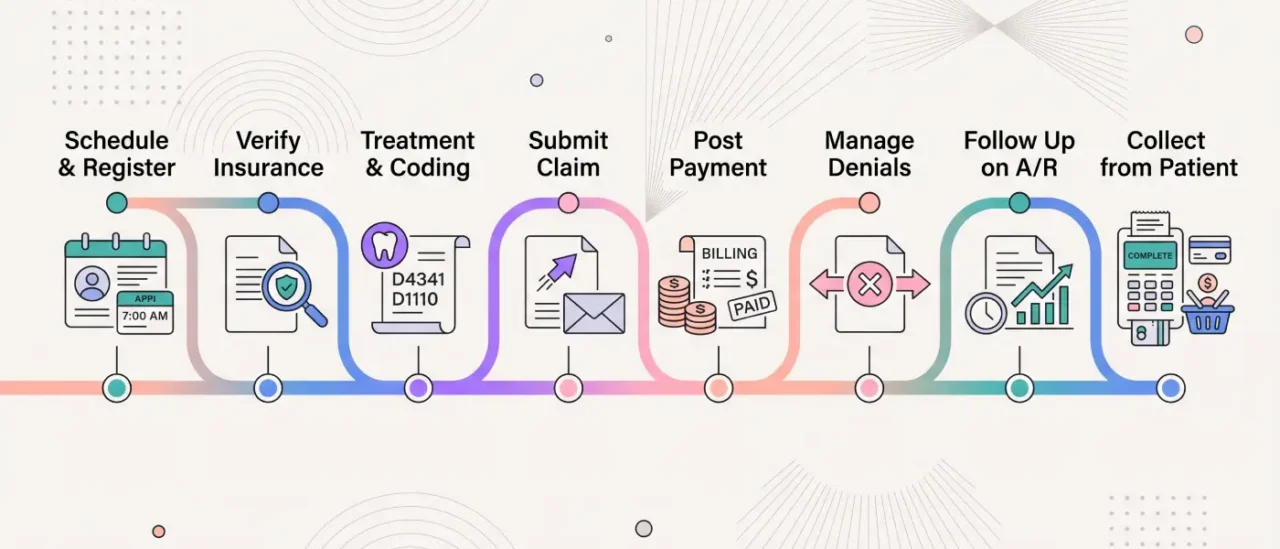
The Dental Revenue Cycle: An 8-Step Process
The cycle runs in three connected phases — front-end work that prevents problems, mid-cycle work that turns treatment into a clean claim, and back-end work that collects what’s owed. A weakness in an earlier phase compounds by the time it reaches a later one.
Front-End: Prevent the Problem Before It Starts
1. Patient scheduling and registration. Accurate insurance IDs, correct procedure codes noted at booking, and complete demographic information at intake prevent the claim errors that surface weeks later as denials.
2. Insurance eligibility and benefits verification. Automated dental insurance verification confirms active coverage, remaining deductible, annual maximums, and code-level frequency limits before the patient is in the chair. Practices verifying by phone the morning of an appointment are working reactively; real-time checks that run automatically at scheduling remove that lag.
3. Treatment planning, estimates, and prior authorization. Translating the clinical plan into a clear patient cost estimate, and securing dental prior authorization or predetermination where a payer requires it before treatment begins.
Mid-Cycle: Turn Treatment Into a Clean Claim
4. Treatment documentation and CDT coding. CDT codes need to match the clinical record exactly — payers audit this relationship closely, and mismatches between what was charted and what was billed are a common, preventable cause of denial.
5. Claim scrubbing and submission. Before a claim goes to the payer or clearinghouse, it should be checked for missing attachments (radiographs, narratives, perio charts), code mismatches, and formatting errors — this is what dental claims submission software does, catching these before submission rather than after and cutting a full resubmission cycle out of the process entirely.
Back-End: Collect What’s Owed
6. Payment posting and reconciliation. Incoming ERAs and EOBs need to be matched to the right claim and reconciled against expected reimbursement; posting errors can make accounts receivable look healthier than it actually is. See dental EOB posting, dental EOB processing and dental insurance payment reconciliation.
7. Denial management and appeals. A claim rejection (caught before adjudication, usually a data or formatting issue, generally correctable and resubmittable) is different from a claim denial (the payer has adjudicated and determined the claim isn’t payable as submitted, which may need correction, added documentation, or a formal appeal). Dental denial management is frequently recoverable if worked quickly with the right documentation — the longer a denial sits unworked, the harder it gets to recover.
8. A/R follow-up and patient collections. Working the dental insurance aging report on a set cadence, prioritized by payer and dollar amount, keeps insurance balances from quietly aging past recovery (see dental claim follow up). On the patient side: accurate upfront estimates, collection at time of service where possible, digital statements, online payment options, and a structured follow-up sequence for anything still outstanding.
Dental RCM KPIs and Benchmarks
Four metrics give the clearest picture of whether a practice’s RCM is actually working. The targets below are commonly cited across dental billing and practice-management sources — treat them as a starting reference, not a universal rule. Benchmarks vary by practice type, payer mix, specialty, and how a given source defines the metric, so the most useful comparison is usually your own practice’s trend over time.
| KPI | What it measures | How it’s calculated | Commonly cited benchmark |
|---|---|---|---|
| Days in Accounts Receivable (DAR) | How quickly the practice collects after service | Total A/R ÷ average daily charges | Often under 30 days |
| Claim Denial Rate | Share of claims denied by payers | Denied claims ÷ total submitted claims × 100 | Often under 5% |
| Net Collection Rate | Collectible revenue actually collected | Payments collected ÷ (charges − contractual adjustments) × 100 | Often 95% or higher |
| Clean Claim Rate (First-Pass Acceptance) | Claims accepted without correction or rework | Claims accepted first pass ÷ total claims submitted × 100 | Often 90–95%+ |
A fifth figure worth watching alongside these: the share of A/R sitting past 90 days. Total DAR gives an average, but it can hide a smaller pool of very old balances dragging the number up — tracking the over-90-day percentage separately (a common target is keeping it under roughly 15%) surfaces that problem before it shows up as a write-off.
Where Dental Practices Actually Lose Revenue
Dental revenue leakage is revenue a practice is entitled to receive but fails to collect because of preventable errors — missed charges, coding mistakes, eligibility issues, denials, underpayments, or unresolved patient balances. It rarely comes from one dramatic failure; it accumulates from small, recurring gaps across the cycle:
- Missed or inaccurate charge capture
- Coding errors that don’t match documentation
- Eligibility issues missed at verification
- Missing claim attachments
- Denied claims that never get appealed
- Underpayments against the contracted fee schedule that go unflagged
- Uncollected patient balances
- Incorrect contractual adjustments
- A/R that ages past the point anyone follows up
Each one is small individually. Across a full patient roster, they add up to real revenue the practice already earned but never collected. If you want to see where that’s happening in your own numbers, Elva’s dental revenue recovery calculator estimates what unworked denials and aging claims are costing. For the mechanics of catching underpayments specifically, see catching dental insurance underpayments and what insurance owes your practice.
RCM Looks Different Depending on Practice Size
A solo practice, a small group, and a multi-location DSO run the same fundamental cycle under different constraints.
Solo practices typically operate with limited administrative staff and heavier reliance on manual processes. Visibility is easy with one location to watch, but formal reporting is often absent, and denial follow-up tends to happen reactively. Even small automation gains — particularly around insurance eligibility verification — tend to have an outsized impact here, since they free up front-desk time otherwise spent on phone calls and portal lookups.
Small groups (2–10 locations) face a consistency problem more than a capacity problem: billing accuracy and follow-up discipline can vary meaningfully by location, and cross-location visibility usually depends on how systems were standardized when the group formed.
DSOs need RCM to function as governance, not a task list — centralized dashboards, standardized denial workflows, and consistent processes across every acquired practice, each of which may have arrived with its own systems and habits. At this scale, automation directly affects scalability and profitability rather than being a convenience.
In-House, Outsourced, or Automated: Choosing an RCM Approach
Practices generally handle RCM one of three ways, and it’s worth being clear-eyed about the tradeoffs of each rather than assuming one is universally right.
| Approach | Advantages | Tradeoffs |
|---|---|---|
| In-house staff | Direct oversight; institutional knowledge stays in-practice; easier day-to-day communication | Dental billing is specialized and payer policy changes constantly; staff turnover can leave real gaps |
| Outsourced RCM company | Dedicated expertise without a full-time hire; provider manages staffing | Not every partner integrates cleanly with existing systems; ongoing service cost; vendor dependency |
| RCM software/automation | Automates repetitive front- and back-end tasks inside the practice’s existing workflow; no handoff to an outside team | Requires the right integration with the practice’s PMS; still needs staff to handle exceptions and appeals |
An outsourced dental RCM company typically manages some or all of eligibility verification, claims submission and follow-up, denial management, payment posting, A/R management, patient billing, and reporting — essentially the full back-end of the cycle, run by a dedicated external team. Software-driven automation covers much of the same ground but keeps the function inside the practice, handling the repetitive, rules-based parts of verification, claim scrubbing, and payment posting directly.
How Technology and AI Are Changing Dental RCM
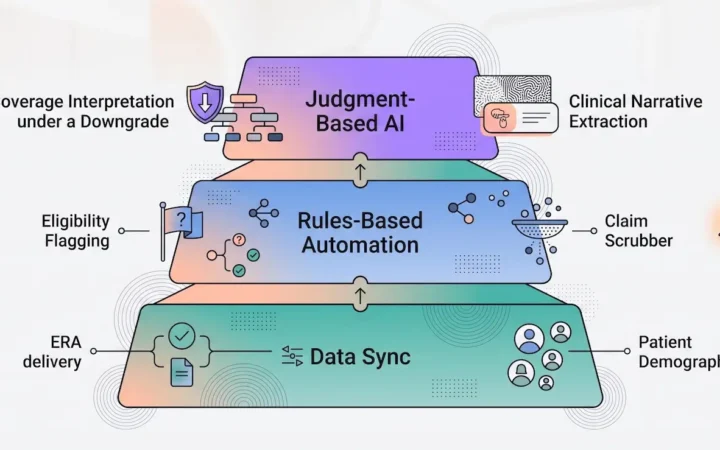
Manual RCM work — phone-based verification, hand-keyed claims, denial tracking on a spreadsheet — is where most of the time and error in the cycle originates. AI-driven tools now handle a meaningful share of that work directly across several categories: automated eligibility checks at scheduling instead of the morning of the appointment, claim scrubbing that catches missing attachments or code mismatches before submission, automated ERA/EOB posting, denial categorization that flags patterns early, and underpayment detection against the contracted fee schedule.
None of this replaces judgment — a biller still needs to review edge cases and handle appeals — but it removes the repetitive, rules-based work that otherwise eats staff time without requiring specialized expertise. That’s the specific problem RCM Brain is built to solve.
How to Improve Dental RCM
A few consistent habits separate practices with healthy RCM metrics from those that are always chasing payments:
- Verify eligibility automatically before every appointment, not reactively at check-in.
- Standardize patient registration so insurance and demographic data is captured correctly the first time.
- Audit documentation-to-coding accuracy on a regular schedule, not just when a denial forces the issue.
- Scrub every claim for missing attachments and code errors before submission.
- Automate ERA/EOB payment posting to cut reconciliation errors.
- Work denials by reason and by payer, on a set cadence, rather than as they pile up.
- Prioritize A/R follow-up by dollar amount and age, not in the order claims happen to sit.
- Review the core KPIs — DAR, denial rate, net collection rate, clean claim rate — on a fixed schedule, not occasionally.
- Audit for underpayments against the fee schedule periodically, since these rarely surface on their own.
- Automate the repetitive, rules-based parts of the cycle so staff time goes toward exceptions and patient-facing work.
Dental RCM Glossary
- A/R — Accounts receivable: money owed to the practice for services already delivered.
- CDT — Code on Dental Procedures and Nomenclature, the coding system used for dental claims.
- Clearinghouse — The intermediary that routes electronic claims between the practice and the payer.
- COB — Coordination of benefits, used when a patient has more than one insurance plan.
- EOB — Explanation of Benefits: the payer’s summary of what was paid, adjusted, or denied on a claim.
- ERA — Electronic Remittance Advice: the digital equivalent of an EOB, used for automated payment posting.
- EFT — Electronic Funds Transfer: the standard method for payer reimbursement to reach the practice.
- NCR / Net Collection Rate — Collectible revenue actually collected, after contractual adjustments.
- PMS — Practice management system, the software a practice uses to run scheduling, charting, and billing.
- Predetermination — A payer’s review of a proposed treatment plan before it’s performed, indicating what would likely be covered.
Frequently Asked Questions
How many steps are in the dental revenue cycle? Most breakdowns describe 7 to 9 stages, depending on how granularly they’re grouped — this guide uses 8. The core sequence is consistent across all of them: scheduling and registration, insurance verification, treatment documentation and coding, claim submission, payment posting, denial management, and patient collections.
Is dental RCM the same as dental billing? No. Billing is the stage covering claim submission and payment posting. RCM is the full system around it, including the front-end work — scheduling accuracy, insurance verification — that determines whether a claim is clean before it’s ever submitted.
What’s included in dental RCM? Patient scheduling and registration, insurance eligibility and benefits verification, treatment documentation and CDT coding, claim scrubbing and submission, payment posting and reconciliation, denial management and appeals, accounts receivable follow-up, and patient collections.
What does a dental RCM company do? An outsourced RCM company typically manages some or all of insurance verification, claims submission and follow-up, denial management, payment posting, patient billing, and A/R management on the practice’s behalf — essentially running the back-end of the cycle as a dedicated external team.
How can dental practices reduce claim denials? The most effective levers are at the front end: verifying eligibility before every appointment rather than reactively, ensuring documentation matches the CDT codes billed, and scrubbing claims for missing attachments before submission. On the back end, working denials within days rather than weeks meaningfully improves recovery rates.
What causes revenue leakage in dental practices? Most commonly: missed charge capture, coding errors, eligibility issues caught too late, denied claims that never get appealed, underpayments against the fee schedule that go unflagged, and patient balances that age without follow-up.
Should a dental practice outsource RCM? It depends on scale and internal capacity. Outsourcing brings dedicated expertise without a full-time hire, but not every partner integrates cleanly with existing systems. Many practices land on a middle path — RCM software that automates the repetitive parts of the cycle in-house, while keeping oversight internal.
Is dental RCM different from medical RCM? Yes. Dental RCM runs on CDT codes rather than CPT/HCPCS, deals with plan-specific rules like annual maximums and frequency limitations that most medical plans don’t use, and requires claim attachments — radiographs, perio charts, narratives — more often than medical claims do.
The Bottom Line
Dental RCM is broader than dental billing. It covers the entire financial lifecycle of a patient account — from scheduling and insurance verification through claims, payment posting, denials, A/R management, and patient collections. The goal isn’t simply to submit claims faster; it’s to reduce the preventable errors that turn earned revenue into a write-off, and to give the practice visibility into exactly where money is getting stuck along the way.
Every stage covered here — eligibility verification, claims submission, denial management, accounts receivable, prior authorization, and RCM Brain — is covered in more depth earlier in this guide, linked in context where each one is discussed.