Connect your practice system
Elva works inside your practice system: it reads claims and payments there and writes claims and postings back, so you keep your clearinghouse and your records. Elva's team sets it up before go-live.
Dental revenue cycle management software that verifies coverage, prepares and follows every claim, works denials and posts every payment, inside your own practice system. Your team confirms until it trusts Elva.
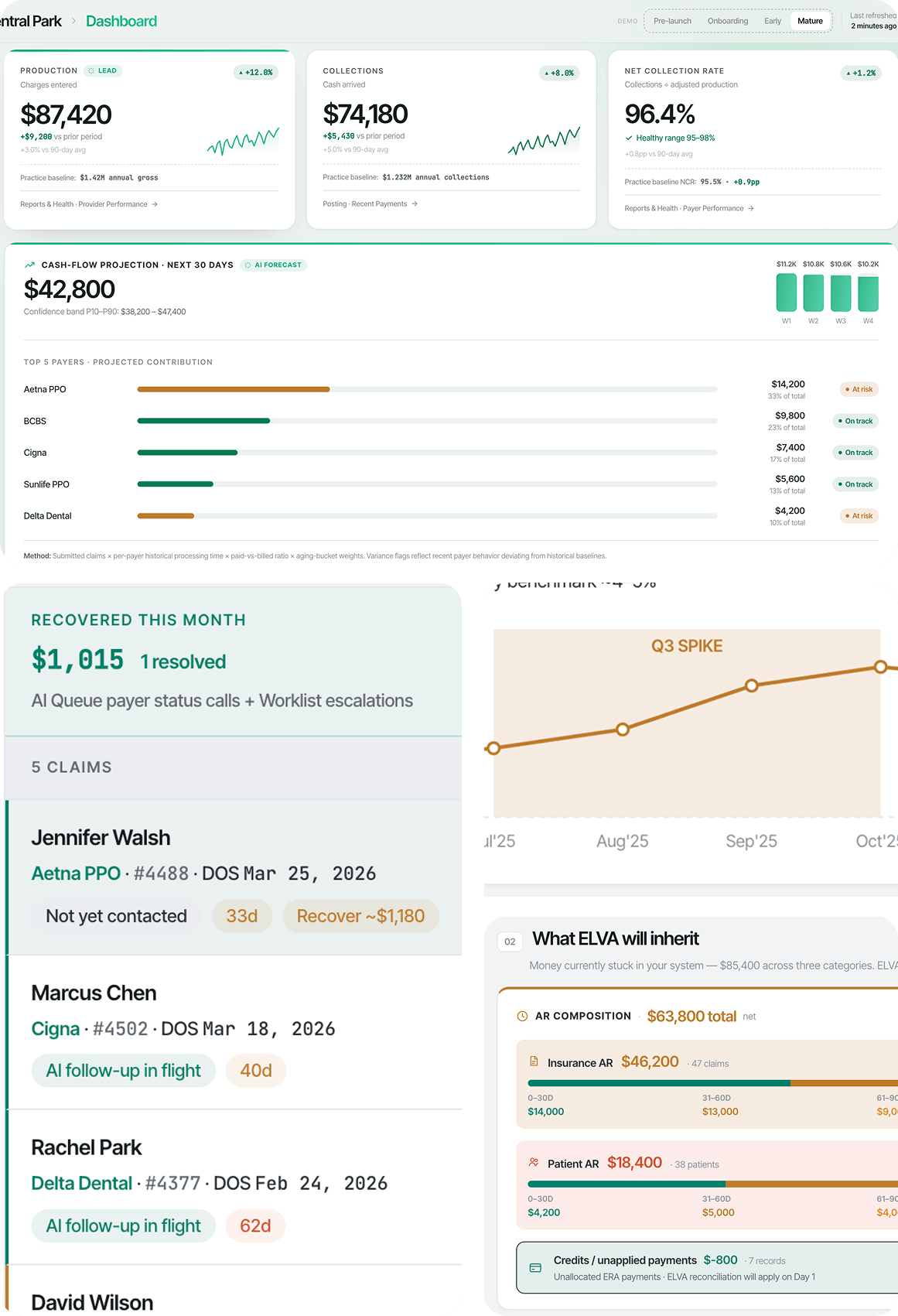
Dental revenue cycle management (RCM) is the process that turns a scheduled visit into collected revenue: verifying eligibility, submitting claims, following up, working denials, posting payments and matching deposits. Elva runs that cycle as one connected system inside your practice system, and your team keeps the decisions. Read what dental revenue cycle management is, or see RCM Brain.
One engine reads and acts at every step — verify · decide · code · capture · appeal · collect
Since the start of 2021, the dental reimbursement rate index has risen 19% while inflation has risen 27%. The gap hasn't closed.1
Source: ADA Health Policy Institute, Q3 2026 update, via Becker's Dental Review
55% of dentists put low insurance reimbursement, denials and other insurance issues among their top three challenges for 2026.2
Source: ADA Health Policy Institute, Q4 2025 survey, via Becker's Dental Review
Dental providers reported $12.01 to check one claim status by hand, against $3.71 electronically.3
37 dental insurance reform laws had been enacted across 18 states by October 2025, on topics such as virtual credit cards, assignment of benefits and AI in claim payment.4
Source: ADA News, October 2025
Practices don't lose this revenue in one big event. They lose it in a hundred small ones: an eligibility check nobody ran, a claim that went out with the wrong code, an underpayment caught too late to appeal, a balance that aged past 90 days while the front desk was on the phone. Elva is the insurance layer that closes those gaps — and every answer it gives traces back to where it came from.
Dental revenue cycle management is the full process of turning a scheduled visit into collected revenue — eligibility, claims, posting, denials, and AR — and it's where most front-office revenue leaks, because each stage hands off to the next and errors compound.
Insurance revenue leaks at seven predictable points, and most practices can't see them until the money is already gone:
coverage not verified before the visit, so the estimate is wrong and the claim is built on bad assumptions
Dental insurance verification softwarecoding errors, missing attachments, and payer-specific rules that turn a valid claim into a denial
Dental claims softwarepayers paying less than the plan should have paid, posted without a second look and caught too late to appeal
Dental EOB postingclaims rejected and never reworked, because nobody had time
Dental claim denial managementclaims that went quiet past the payer's usual time while the team focused on today's schedule
Dental claim follow upremittances that arrive in an envelope, wait in a pile, and get keyed in late or not at all
Dental EOB processinginsurance payments that never get tied to a bank deposit, so shortfalls go unnoticed
Dental insurance payment reconciliationElva addresses each of these as one connected system rather than seven separate tools, because the leak at one stage is usually created at the one before it.
Each step has its own page. Start where your practice leaks the most.
Dental insurance verification software should check coverage before the patient is in the chair. Elva verifies every insured visit the day before from five sources: electronic checks, your own claim history, payer manuals, the payer's portal and, only when needed, a call. Each fact is recorded with where it came from.
Maximums, frequencies and downgrades are surfaced before the estimate, so the claim doesn't fail on an assumption nobody checked.
Dental claims software should prepare every claim with the x-rays, perio charts and narrative the payer asks for, and show what is missing before it goes out. Your team confirms each claim during training, and Elva suggests autopilot only after about 200 confirmed claims.
Pre-authorizations are caught at booking: Elva spots the procedures a plan requires approval for, prepares the request with its documents and follows it until the payer answers. The ADA notes that a pre-authorization is not a guarantee of payment.5
Dental claim denial management means working out why a claim was denied or paid short, then preparing the appeal or the corrected claim and following it until it is answered. Elva does that work, and clinical appeal letters go to the treating dentist to approve, even on autopilot.
Appeals have deadlines: the ADA notes that some plans require an appeal within six months of the original denial.6 A denial found the day the payment arrives leaves the whole window to prepare it.
Dental claim follow up means checking on every claim that has gone quiet. Elva learns how long each payer usually takes from your own claims, checks the status once that time has passed, signs in to the payer's portal, and calls the payer when the portal has no answer.
Every call opens by saying it is Elva, an automated assistant calling for your practice, and that the call is recorded. Anything Elva cannot settle comes to your team with every try shown.
Dental EOB posting means recording each insurance payment per procedure: what the insurer paid, the write-off and what the patient owes. Elva reads every payment, works out the odd ones first, posts it, and reads your practice system back to check the result.
Your team confirms each posting during training, and any posting can be undone.
Dental EOB processing turns the paper EOB that arrives with a check into postings. Elva reads each EOB down to the claim line, matches it to the patient and the claim, and closes each check's batch only when it balances to the check.
Virtual card payments get their own list, and every paper check is followed until a bank statement shows it deposited.
Dental insurance payment reconciliation matches each insurance deposit on your bank statement to the payments posted behind it, and shows what does not tie. A missing check or a short deposit shows up while it can still be chased.
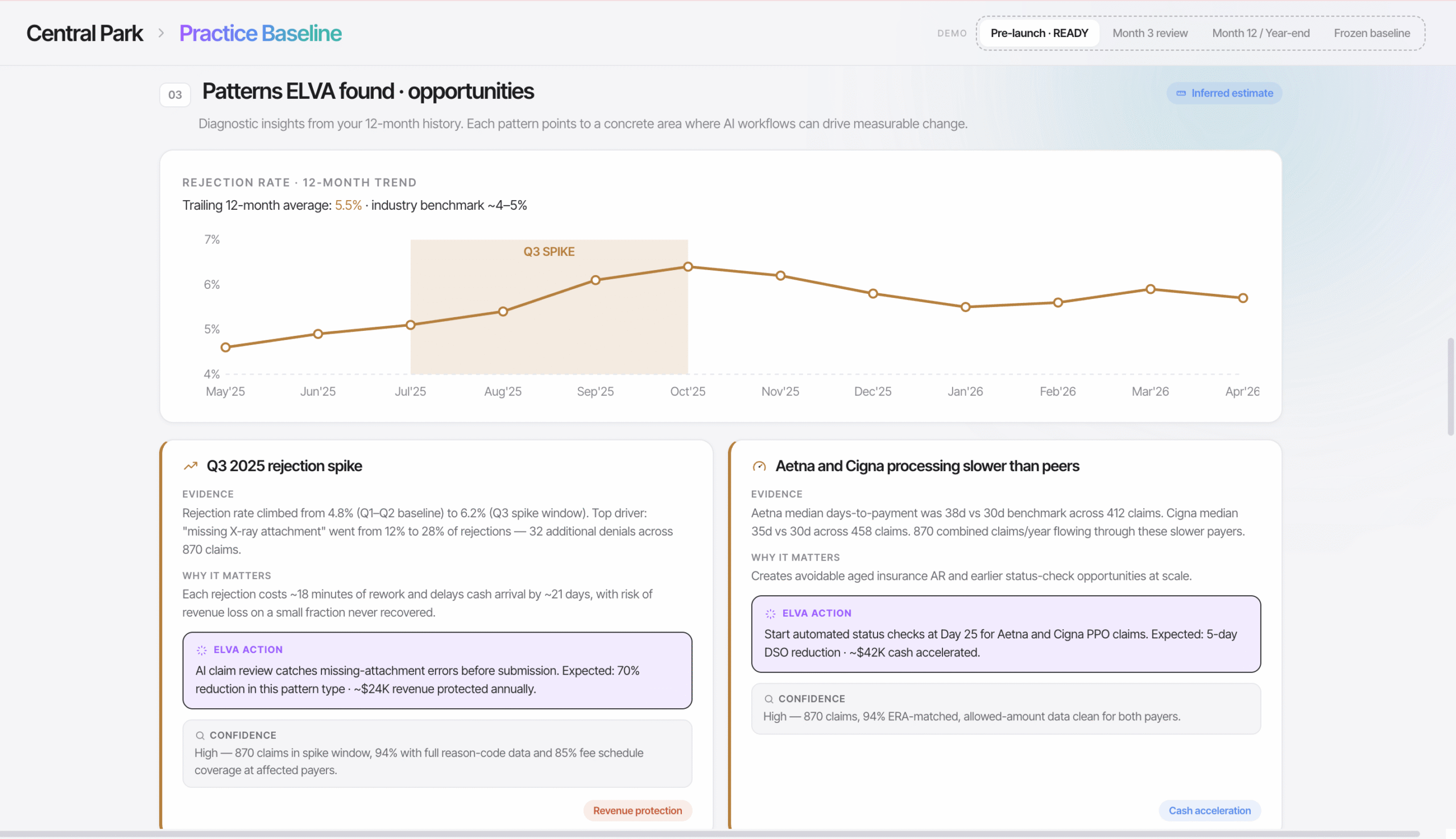
A claim is only as strong as the chart behind it. Elva's AI clinical notes flag missing documentation as your team charts, so the note is complete before the claim is built.
Insurance paper arrives by fax, mail, upload and photo, and each piece belongs somewhere different: an EOB to posting, a denial letter to denials, a request letter to the claim, an insurance card to the patient. Document Center takes it all in one way, reads it, sends it where it belongs and files a copy in the patient's documents in your practice system.
Fax it, upload it or photograph it on an iPad. Elva can also download a missing page from the payer's portal itself.
Elva works out what each document is and reads it down to each claim line.
During training, nothing is posted until someone on your team confirms it.
Elva sends each document where it belongs and files a copy in the patient's documents.
Every answer Elva produces is also a conversation you can have. Instead of digging through portals, ledgers, and EOBs, your team just asks — in plain language — and Elva answers from your own data and rules.
The whole revenue cycle, queryable — so a new biller is productive on day one, and the answer is always traceable to where it came from.
 Elva
On your data
Yes — D2740 was paid as D2750 (downgrade to PFM). Aetna applies an alternate-benefit clause on posterior crowns under this plan. We've seen the same pattern on 12 of your last 14 Aetna crown claims.
7 claims, $4,210 total. Three are awaiting payer response, two need a corrected resubmission, and two have appeals drafted and ready for your review.
Three steps, running on top of the PMS you already use.
Elva works inside your practice system: it reads claims and payments there and writes claims and postings back, so you keep your clearinghouse and your records. Elva's team sets it up before go-live.
Verification, pre-authorizations, claims, follow-up, appeals and posting run in the background. Your team confirms each kind of work until it trusts Elva, then the practice turns autopilot on or off.
Only what Elva could not finish after trying every channel reaches your team, on one page, with every try shown.
One connected cycle, from the visit to the deposit.
Where the day-to-day work changes.
| Task | By hand | With Elva |
|---|---|---|
| Eligibility checks | Portal logins and phone calls, often the morning of the visit | Checked the day before from five sources, with where each fact came from |
| Pre-authorizations | Found when the patient is already in the chair | Caught at booking, with the request prepared and followed until the payer answers |
| Claim preparation | Coded and assembled by hand for each payer | Prepared with x-rays, perio charts and narrative, with missing items flagged before submission |
| Claim status | Checked one claim at a time when someone has a free hour | Checked once the payer's usual time has passed, by portal and by call |
| Denials | Worked when time allows, sometimes after the appeal window | Worked out, with the appeal or corrected claim prepared and followed until answered |
| Payment posting | Keyed line by line from the EOB or ERA | Posted per procedure and read back to check the result |
| Paper EOBs and checks | Stacked until someone enters them | Read to the claim line, one batch per check, closed only when it balances |
| Deposit matching | Reconciled at month-end, if at all | Each deposit matched to the payments behind it, with what does not tie shown |
Habits that keep revenue from slipping, whether you use Elva or not.
Re-check whenever a patient brings a new card, a new member ID or a new plan year. Compare tools in our guide to the best dental insurance verification software.
Know which procedures each payer wants x-rays, perio charts or a narrative for, and attach them the first time. See how to automate dental insurance claims.
A rejected claim never reached the payer. Fix it and resend it before it ages.
Learn how long each payer usually takes from your own claims, and check as soon as a claim passes that, rather than at a fixed 30 days.
Note the date, the representative and what was said. It is your evidence if the claim is disputed later.
Send appeals by a method that proves when they were sent, and confirm the payer received them. Our guide shows how to reduce dental claim denials before they need an appeal.
Then match each insurance deposit on the bank statement to what was posted, so a missing check or a takeback shows up early. More in our guide to dental payment posting automation.
Filed too late, denied and never appealed, small balance: the reasons show where the cycle leaks. Short payments leak too: see how to catch insurance underpayments.
The insurance layer covers the cycle from eligibility to deposit.
Every insurance gap on this page — an eligibility check missed, a claim denied, a balance that aged too long — adds up to a real number specific to your practice size and claim mix.
Elva works with Dentrix, Dentrix Ascend, Open Dental, Eaglesoft, Curve Dental, Denticon and CareStack, and every feature is available on all seven. It reads claims and payments in your practice system and writes claims and postings back, so your team keeps one set of books. You keep your clearinghouse and your ERA enrollment.
 Authorized API Partner
Dental revenue cycle management software does the repeatable insurance work in the revenue cycle instead of tracking it. Elva verifies coverage, prepares and submits claims, follows up on quiet claims, works denials and posts payments in your own practice system, and brings your team only what it could not finish. For the full process and the KPIs to track, read what dental revenue cycle management is.
Start with the steps that repeat: verification before the visit, claims prepared with the attachments each payer asks for, follow-up on quiet claims, and payment posting. Elva does these inside your practice system, and your team confirms the work until you turn on autopilot. Our guide explains how to automate dental insurance claims, stage by stage.
No. Elva handles the repetitive checking, preparing and tracking, and brings the exceptions to your team. People stay in charge of decisions and patient conversations.
Yes. During training nothing is submitted until someone on your team confirms it, one claim at a time. Elva suggests autopilot once, after about 200 confirmed claims, and the practice turns it on or off itself. On autopilot, Elva holds any claim it isn't sure about and sends it back with the reason in words.
Elva prepares each claim with what the payer asks for and shows what is missing before it goes out, so fewer claims are rejected. When a claim is denied or paid short, Elva works out why, prepares the appeal or the corrected claim, and follows it until it is answered. See dental claim denial management.
Elva works with Dentrix, Dentrix Ascend, Open Dental, Eaglesoft, Curve Dental, Denticon and CareStack, and every feature is available on all seven. You keep your clearinghouse and your ERA enrollment.
Paper EOBs, checks and letters come in through Document Center by fax, upload or an iPad photo. Elva reads each EOB down to the claim line, matches it to the patient and posts it, one batch per check. See dental EOB processing.
Yes, when the answer is not in the ERA or the portal. Elva signs in to payer portals itself, and one-time sign-in codes go to Elva's own phone number and email, never to your team. Every call opens by saying it is Elva, an automated assistant calling for your practice, and that the call is recorded.
Elva's team sets it up before go-live: we review your practice's history, learn your payers' rules, set up portal access and connect to your practice system. There is no self-serve setup. Your Elva contact confirms the timeline after a short discovery call.
Elva signs a business associate agreement with every practice, and access is limited to what each workflow needs. Ask us for our security documentation during evaluation.
Book a 20-minute demo and we'll walk through the cycle with your own payers, and show where your team stays in control.