Effective dental appointment reminders are short, name the date, time and place, and give the patient one easy way to confirm or reschedule. The American Dental Association notes that many practices confirm at least a day ahead by text, email or phone, and suggests choosing the method and timeframe that fit your patients.
Most reminder guides hand you a pile of messages. This one gives you the sequence those messages belong to: what to send, when, what happens after each possible reply, and what to do when the patient says nothing. You’ll also find copy-ready text and email templates, a call script, and the consent and privacy points to check before you send.
The reminder rule
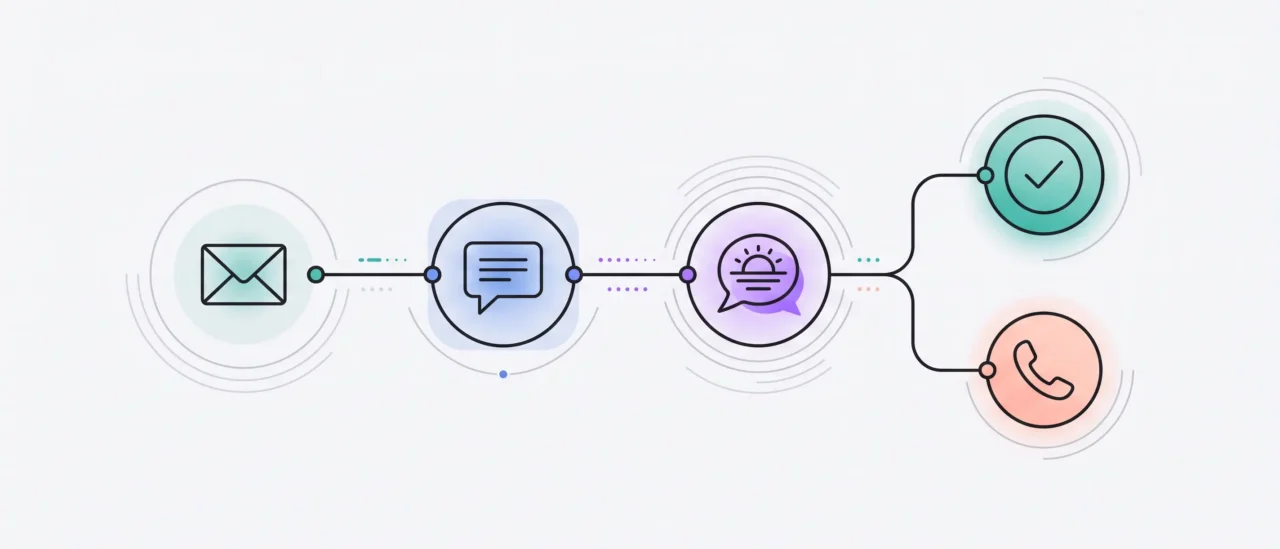
Don’t send reminders just because the calendar says so. Send the next message based on what the patient did.
- Confirmed: stop confirmation requests.
- No response: send the next confirmation request.
- Still no response: escalate to a call.
- Rescheduled: restart the sequence for the new appointment.
- Missed: offer to rebook.
These are our operating recommendations, not ADA guidance.
Dental appointment reminder vs. confirmation
Short answer: a dental appointment reminder tells the patient an upcoming visit is approaching. A confirmation request asks the patient to say they still plan to attend. A single message can do both, and most of the templates below do.
The two jobs are different. A reminder works even if nobody replies. A confirmation needs a reply, which makes it the step that gives your team something to act on. A dental appointment confirmation text is simply a message that asks for that reply.
“Confirmation” also has a second meaning: the message that says your appointment is booked. That’s a booking confirmation, and it goes out once, when the visit is scheduled. This guide is about the other kind, the request that comes back to your schedule as confirmed or not.
What every dental appointment reminder should include
Short answer: your practice name, the day, date and time, the location, one action, and a phone number, with no unnecessary treatment or health detail.
- Practice name, so the patient knows who is texting.
- Day, date and time, written out. “Tuesday, Oct 14 at 9:30 AM” is clearer than “tomorrow” in a message read later.
- Location, especially for new patients and multi-location groups.
- One action: reply C to confirm, reply R to reschedule, or tap a button in an email.
- A phone number, for anything that doesn’t fit in a reply.
- No unnecessary clinical detail. The ADA’s HIPAA guidance says a patient’s name plus the date and time is generally fine, while specific treatment, health conditions or pre-medication details can cause problems. When in doubt, say “visit.”
A dental appointment reminder sequence that branches
Short answer: a practical workflow is to send the first confirmation request two to three days before the visit, follow up the day before if the patient hasn’t responded, call if they still haven’t, and use the morning-of message for logistics rather than another confirmation request. No single schedule fits every practice.
The ADA suggests talking with your team about which method and timeframe suit your patient base. Treat the timings below as a starting point and adjust them to yours.
| Step | Who gets it | Channel | When | Purpose |
|---|---|---|---|---|
| 1 | Patients who asked for email | About a week ahead | Notice and any forms | |
| 2 | Patients who agreed to texts | Text | Two to three days ahead | First confirmation request with C or R |
| 3 | Still unconfirmed | Text | The day before | Second ask |
| 4 | Still unconfirmed | Phone call | After the second ask | A personal last attempt |
| 5 | Confirmed | Text | Morning of the visit | Logistics only: time and address |
| 6 | Rescheduled | The patient’s channel | When they reschedule | Restart from step 1 for the new visit |
| 7 | Missed | Text | Same day | Offer to rebook |
Every step goes out by the channel the patient agreed to. A patient who hasn’t agreed to texts gets the same step by phone or email instead, and a patient who asks to be contacted a different way should be.
The branch is what turns a schedule into a system. Once a patient confirms, they leave the escalation path and receive only logistics. If they don’t confirm, they move to the next step. After a reschedule, start the sequence again for the new appointment rather than continuing the old one. Unconfirmed appointments show up days in advance on the schedule, which is when a second text or a call can still change the outcome.
Practices that want to run this on a schedule can use automated appointment reminders instead of working the list by hand.
Why some patients get a reminder every day
Reminders continue until the visit is confirmed. A well-built sequence stops the moment the patient confirms. A poorly built one keeps going, and a helpful nudge turns into noise. Avoid sending the same confirmation request repeatedly. Once a patient confirms, stop asking them to confirm.
Dental appointment reminder and confirmation text templates
These are written to be concise. Count the final message after you insert your practice name, patient name, links and other variables, since those change the length and how the message is split into segments. Say “visit” rather than naming the procedure.
Step 2: first confirmation request
Hi [Name], this is [Practice]. See you [Day], [Date] at [Time]. Reply C to confirm or R to reschedule.
Step 2: new patient
Welcome to [Practice], [Name]! Your first visit is [Day], [Date] at [Time]. Forms: [Link]. Reply C to confirm or R to reschedule.
Step 2: when patients need to bring something
Hi [Name], your visit at [Practice] is [Day], [Date] at [Time]. Please bring your insurance card. Reply C to confirm or R to reschedule.
Step 3: second ask for unconfirmed patients
Hi [Name], we haven’t heard back about your visit tomorrow at [Time]. Reply C to confirm or R to reschedule, or call [Phone].
Step 5: morning of the visit
Good morning, [Name]! We’re looking forward to seeing you today at [Time] at [Practice]. Address: [Address].
Reply to R (reschedule request)
No problem, [Name]. Reply with a day that works, or call [Phone], and we’ll find you a new time.
Cancellation acknowledgment
Hi [Name], we’ve cancelled your visit on [Day], [Date] at [Time] as requested. Reply R or call [Phone] whenever you’re ready to rebook.
Patient running late
Thanks for letting us know, [Name]. We’ll see you when you arrive. If you’ll be more than [Minutes] minutes late, please call [Phone].
Edit the late-arrival message to match your own policy.
Step 7: missed appointment
Hi [Name], we missed you today at [Practice]. Reply R and we’ll find a new time, or call [Phone]. We’re happy to help.
Dental appointment confirmation email templates
Short answer: use email for notice, forms and anything a patient may want to keep, and send it only to patients who asked for email. The ADA’s guidance is to use email only at the patient’s specific request.
Step 1: first reminder with one-tap confirmation
Subject: Your visit at [Practice] on [Date]
Hi [Name],
Your visit is [Day], [Date] at [Time] at [Address].
[Confirm my visit]
Need a different time? [Reschedule] or call [Phone].
See you soon, [Practice]
Step 1: new patient with forms link
Subject: Welcome to [Practice]: your first visit on [Date]
Hi [Name],
We’re glad you’re joining us on [Day], [Date] at [Time] at [Address].
Please complete your forms before you arrive: [Link]
[Confirm my visit]
Questions? Call us at [Phone].
[Practice]
Step 3: follow-up for unconfirmed patients
Subject: Still planning to join us on [Date]?
Hi [Name],
We’re holding [Day], [Date] at [Time] for you and haven’t heard back yet.
[Yes, I’ll be there] or [I need a different time]
If you’d rather talk, call [Phone].
[Practice]
A single button keeps the effort low. The patient taps instead of composing a reply.
What to do when patients reply
Short answer: treat C or Y as confirmed, R as a reschedule request, STOP as an opt-out, and send anything else to a person.
Writing the reminder is half the work. The other half is knowing what happens to each answer.
| Patient replies | What should happen |
|---|---|
| C, Y, “yes,” “confirm” | Mark the visit confirmed in the schedule. Stop further confirmation requests. Send logistics only from here. |
| R, “reschedule,” “can’t make it” | Offer new times or a booking link. Decide in advance whether the original slot is held while they choose. |
| A new time is chosen | Restart the reminder sequence for the new appointment. Don’t continue the old one. |
| STOP | Honor it immediately, record it, and switch that patient to the contact method they prefer, such as phone. |
| Anything else (a question, a complaint) | Route to a person. Don’t guess. |
| No reply | Move to the next step in the sequence. |
A simple reply such as C to confirm and R to reschedule is easy to understand and easy to match, and a confirmed reply should update the schedule on its own so nobody has to read a log of texts. Keep a person in the loop for anything that isn’t a clear yes or no. A system that handles the easy answers and hands you the hard ones is doing the work you can’t staff.
When text and email aren’t enough: the reminder call
The ADA’s practice management guidance notes that most dentists still find phone confirmation the most effective approach, because a familiar voice carries a personal connection that texts and email lack. It also suggests asking patients who tend to miss appointments to call back to confirm they got the message and plan to come.
That makes the call a sensible last step for patients who haven’t answered. Keep it short.
Reminder call script
Hi, this is [Name] from [Practice], calling for [Patient]. I’m calling to confirm your visit on [Day] at [Time]. Can I mark you as confirmed?
If yes: Wonderful, we’ll see you then.
If they need a change: No problem. Let’s find a time that works.
Voicemail version
Hi [Patient], this is [Practice] calling about your visit on [Day] at [Time]. Please call us back at [Phone], or reply C to the text we sent to confirm. Thank you!
A team member can make these calls, or an AI voice agent can. If you use one, three things matter:
- Vet the service. The ADA advises checking out any service you hire to make automated confirmation calls, and notes that practices should be familiar with the federal Telephone Consumer Protection Act.
- Check how it handles patient information. A vendor that handles patient information on your behalf generally needs a signed business associate agreement under HIPAA.
- Check disclosure. Requirements for identifying automated or AI-generated calls can vary by state and use case, so confirm what applies before you deploy a voice workflow.
At Elva, whether the AI announces itself as automated is configurable per practice. See how AI reminder calls work with the AI Receptionist.
Multilingual dental appointment reminders
Short answer: yes, when your patients speak more than one language. Send the whole sequence, not just the first message, in the patient’s preferred language, and make sure replies are recognized in that language too.
A patient who prefers Spanish should get the confirmation request, the second ask and the morning-of note in Spanish. Here is one step in both languages, and a second Spanish message for unconfirmed patients. Have a fluent speaker review any translation before you send it.
Step 2, English
Hi [Name], this is [Practice]. See you [Day], [Date] at [Time]. Reply C to confirm or R to reschedule.
Step 2, Spanish
Hola [Nombre], le escribe [Clínica]. Le esperamos el [Día], [Fecha] a las [Hora]. Responda C para confirmar o R para reprogramar.
Step 3, Spanish (unconfirmed)
Hola [Nombre], aún no recibimos su confirmación para mañana a las [Hora]. Responda C para confirmar o R para reprogramar, o llame al [Teléfono].
Two practical notes. Some accented or non-GSM characters can change how an SMS is encoded and reduce the number of characters available in a single message segment, so a Spanish text may arrive as more than one part. If you support multilingual reminders, check your messaging provider’s character-count rules before finalizing templates. And make sure replies are recognized in each language you send in, whichever keywords you choose.
For more on running every patient message in the patient’s own language, see reminders in the patient’s preferred language.
Missed appointments and after-visit follow-up
A missed appointment is still a patient you want back. Send the missed-appointment text the same day, while the visit is fresh, and offer to rebook. The template is in the text section above.
A short thank-you after a routine visit also keeps the line open without any clinical content:
Thanks for visiting [Practice] today, [Name]. Questions about your visit? Reply here or call [Phone].
Clinical follow-up after a procedure is a separate workflow with its own rules. For that, see automated post-op follow-up. For patients who are overdue rather than missed, that’s recall, covered on the recall page.
Keeping dental reminders compliant
This is general information, not legal advice. The ADA’s own materials say the same about themselves. Check your obligations with your counsel and your state.
What the ADA says (from Appointment Confirmations and HIPAA 20 Questions, question 15)
- Ask patients which method of contact they consent to, and note it so future reminders follow it.
- Use email only at the patient’s specific request.
- You can remind patients of appointments, but restrict what others could see in a text, email or voice message, and be discreet.
- A patient’s name plus the date and time, sent to the number or address the patient provided, is generally fine. Specific treatment, health conditions and pre-medication details can cause problems.
- Accommodate reasonable requests to be contacted by alternative means or at alternative locations. A practice may require such requests in writing and may not require an explanation.
- Be familiar with the federal Telephone Consumer Protection Act. The ADA points to an FCC Enforcement Bureau advisory on autodialed text messages.
- Vet any service you hire to make automated confirmation calls.
- Software vendors that handle patient information for you generally need a signed business associate agreement.
Legal context
- The Telephone Consumer Protection Act is federal law, and state rules may add to it. HIPAA applies to covered entities and their business associates. What applies to you depends on how and what you send, so confirm it with counsel.
Our recommendations (operating rules, not ADA guidance)
- Keep SMS reminders to the operational details the patient needs: the practice, date and time, location, and a way to confirm or reschedule. Avoid unnecessary treatment or health information, including a visit type that could reveal it.
- Honor a STOP reply right away and update the patient’s preferred contact method.
- Follow the reminder rule above: confirmed patients exit the confirmation flow, unconfirmed patients escalate, and the same request isn’t repeated.
- Before any vendor contacts patients for you, confirm how they handle consent, privacy and opt-outs.
- At Elva, patient data is encrypted in transit and at rest, and every practice has a signed BAA.
How to automate the reminder workflow
The workflow isn’t hard to understand. The hard part is running it consistently across every appointment, every reply and every exception. This is how Elva’s automated appointment reminders handle each branch:
- Before the visit: steps are scheduled days or hours ahead, with instructions specific to the appointment type.
- Patient confirms (a text reply, or one tap in email): the confirmed path takes over and the confirmation steps stop.
- Patient asks to reschedule: the request is handled by reply in the text thread.
- Patient doesn’t respond: the unconfirmed path continues, then an AI reminder call goes out through the AI Receptionist.
- Patient misses the visit: a missed-appointment follow-up goes out.
- Patient prefers another language: every message goes out in that language.
Anything that needs a person goes back to your team, so the front desk can spend its time on the patients standing in front of them. That’s the difference between sending reminders and running a reminder workflow.
Frequently asked questions
What is a good template for a dental appointment reminder message?
Name your practice, the day, date and time, and one action. For example: “Hi [Name], this is [Practice]. See you [Day], [Date] at [Time]. Reply C to confirm or R to reschedule.” Keep it to two sentences and leave treatment details out.
When should you send dental appointment reminders?
The ADA notes that many practices confirm at least a day ahead. A practical workflow is a first confirmation request two to three days before the visit, a second ask the day before for anyone who hasn’t responded, and a morning-of message for logistics. Adjust it to your patients.
What’s the difference between an appointment reminder and a confirmation?
A reminder tells the patient a visit is coming. A confirmation asks the patient to say they still plan to attend, and needs a reply. A single message can do both.
Why does my dentist send more than one reminder?
Reminders usually continue until the visit is confirmed. If you haven’t replied, you move to the next step, often a second text and then a call. Once you confirm, a well-built sequence stops asking and sends only logistics.
Can dental appointment reminders be sent by text?
Yes. The ADA says reminders can go by phone, email or text, and advises asking patients which method they consent to. Keep texts discreet, with name, date and time rather than treatment details, honor STOP replies, and be familiar with the Telephone Consumer Protection Act.
What should patients reply to confirm?
A single letter keeps it simple: C or Y to confirm, R to reschedule. Say so in the message, and accept natural variations like “yes” or “confirm” too.
What happens if a patient doesn’t respond?
They move to the next step: a second text the day before, then a phone call. The ADA also suggests asking patients who often miss appointments to call back to confirm. Anything that isn’t a clear yes or no should go to a person.