
The call doesn't happen
It isn't a decision. The phone rang, someone walked in, and it was four o'clock. The patient who most needed the reminder is the one who doesn't get it. Elva makes every confirmation, at the times you set.
Elva confirms each visit by text, email or call at the times you set, puts any request for a new time in front of your team, and checks in after treatment when the procedure calls for it. You lay out the steps once, the way you would brief a new front-desk hire.
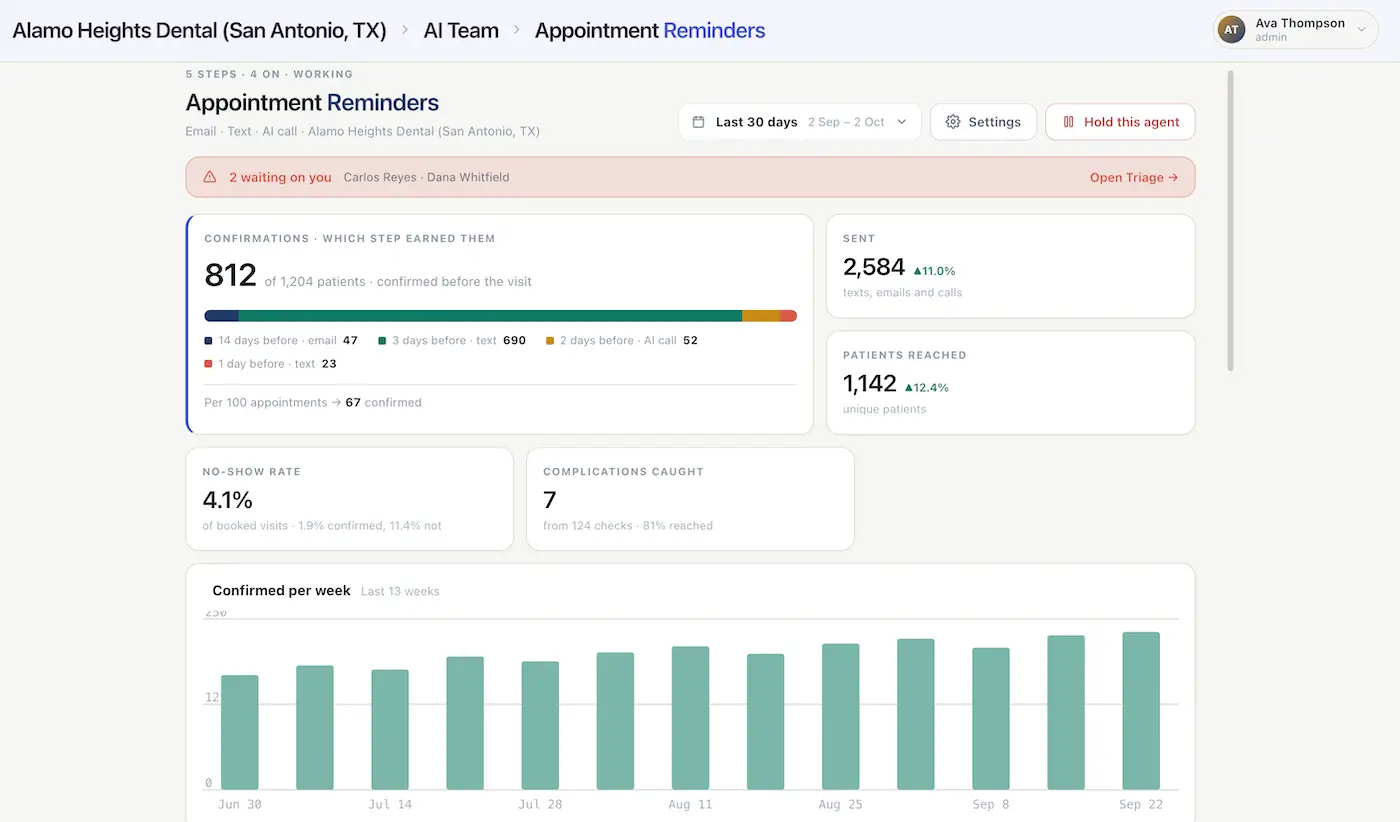
You choose the messages before a visit, for example an email two weeks out, a text three days out, and a call for patients who haven't confirmed.
Write each message yourself, or give Elva a short brief and let it write each one. Preview every step as real patients would see it, in their language, and send it to your own phone first.
Patients confirm, and the calendar shows it. A patient who needs a new time goes to your team. The day before, one message carries the reminder and what to bring.
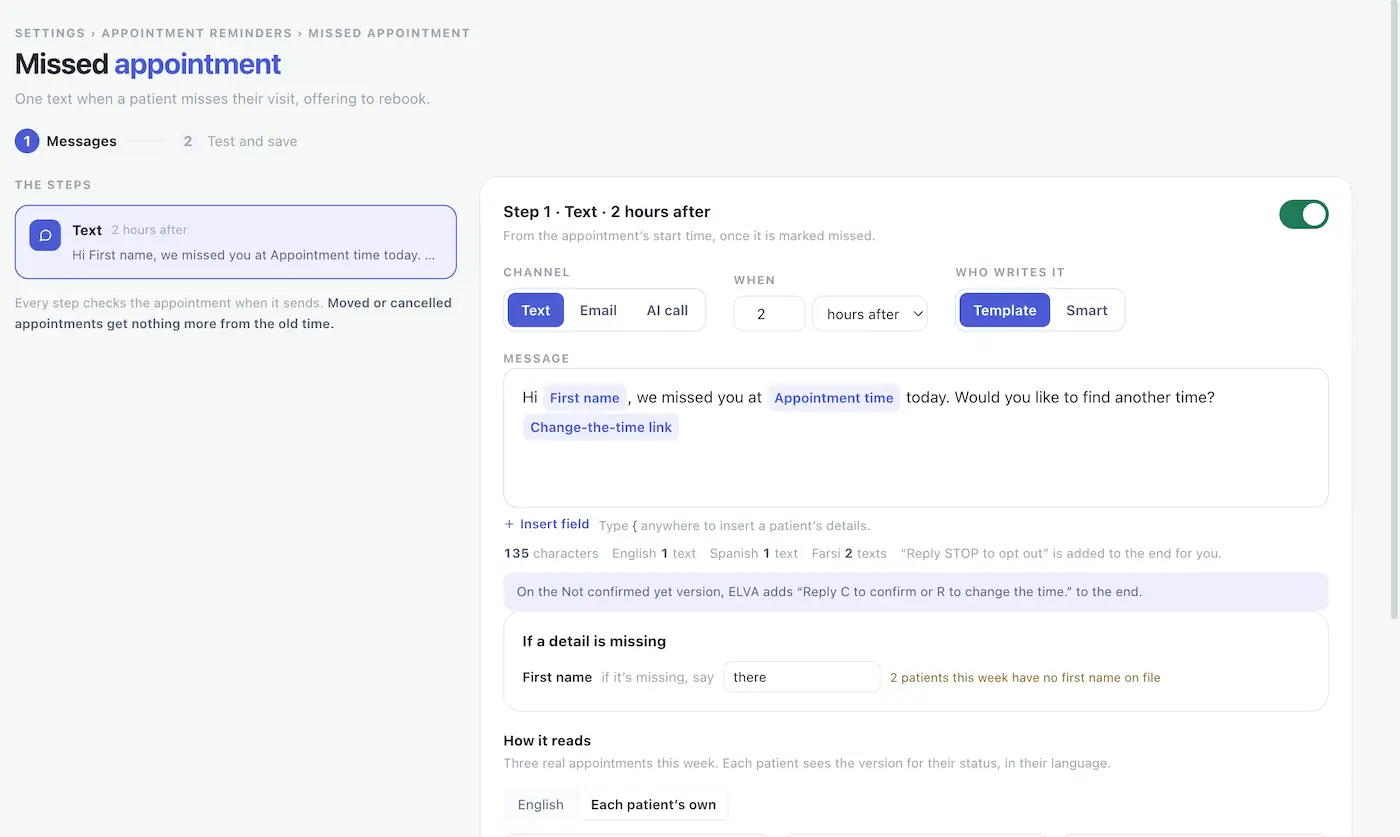
After procedures that call for it, Elva checks in on the patient. After a missed appointment, it sends a text offering to rebook.
Nothing goes to a patient until you have checked it and pressed Start.
Lead time — steps are timed in days or hours before the visit, and a step that has already passed at booking is skipped
Confirmed or not — each step can go to everyone, or only to patients who have or haven't confirmed
Different words — a patient who has confirmed and one who hasn't can each get a message written for them
Channels — text, email or call, in the order you choose
Calls — calls go only to patients who haven't confirmed
Easy to confirm — patients confirm by replying to the text or tapping a Confirm button in the email
Needs a new time — a patient who wants a different time reaches your team in the Triage Inbox, with everything already tried
Visit instructions — set per appointment type, such as "bring your insurance card" or "no food six hours before," and sent in writing
One message, not two — the reminder and what to bring go together in a single message
Patient language — every message goes out in the patient's own language
Confirmed status — shown on the calendar, and your team can filter to the appointments that haven't confirmed
Moved or cancelled — every step checks the appointment when it sends, so a moved or cancelled visit gets nothing more from the old time
Limits and opt-outs — messages go out only inside your sending hours, no patient gets a pile of messages, and opt-outs are honored on every channel
That list is what a careful front-desk hire does for each appointment, if the phone isn't ringing. Elva does it for every appointment, every day.
In a 20-minute demo we show how the steps are laid out, how each message reads for a real patient in their own language, and what your team sees when a patient needs a new time.
Dental appointment reminder software contacts patients before a visit, asks them to confirm, and shows the answer on your schedule. Elva does it by text, email and call at the times you set, and checks in after treatment when the procedure calls for it.
By hand, confirmations are phone calls squeezed into the gaps. At two minutes a call, 30 appointments a day is an hour of calling, and the calls happen when someone is free, which is rarely. A voicemail gets logged as a call made, and the patient who most needed the reminder is the one who isn't reached.
Most reminder tools send the same sequence to every patient. In Elva you lay out the steps, and a step that has already passed when the appointment is booked is skipped. A patient who booked six weeks ago is reached at each step, and one who booked yesterday for tomorrow isn't chased four times in two days.
You set it up the way you would brief a new hire: what to send, when, and in what words. Patients who have confirmed and patients who haven't can get different steps and different messages, and visit instructions are set per appointment type. When a patient needs something a person should handle, a person does.
It isn't a decision. The phone rang, someone walked in, and it was four o'clock. The patient who most needed the reminder is the one who doesn't get it. Elva makes every confirmation, at the times you set.
A message left is recorded as a call made, and the two are not the same thing. The appointment is still unconfirmed. In Elva, confirmed status shows on the calendar, so your team can see exactly who hasn't answered.
A list built from today treats an appointment made six weeks ago and one made yesterday the same way. The long-lead patient is reminded once, far too late, and the short-notice one is chased. Elva works from the booking, and skips steps that have already passed.
The patient is confirmed, but nobody mentioned the antibiotic, the fasting or the driver. They arrive and the visit can't go ahead. Elva sends visit instructions per appointment type, in writing, with the reminder.
Illustration, not a result: 30 appointments a day at two minutes per confirmation call is one hour of calling a day, or five hours over a five-day week. After treatment, post-op follow-up has its own page, and two-way texting covers how Elva answers patients' replies.
Elva runs alongside your practice management system rather than replacing it, with real-time sync across Dentrix, Dentrix Ascend, Open Dental, Eaglesoft, Curve Dental, Denticon, and CareStack.
It reads your schedule live and shows confirmed status on the calendar. Because every step re-checks the appointment when it sends, no one receives a reminder for a visit that has since moved or been cancelled.
 Authorized API Partner
 Official API Vendor Partner
Taught like a new hire. You tell Elva how your office works, in plain English: the steps, the words and who to ask. It follows that, and when it isn't sure it hands the patient to a person. It never changes its own behavior. Every change is your decision.
Check it before it goes. Preview each step as real patients would see it, in each version and language, and send it to your own phone. Messages Elva writes are checked before they go, and your backup message is sent if one fails.
Limits that protect patients. Messages go out only inside your sending hours, with a limit on how many any patient gets across everything Elva sends. The most important message goes first, and opt-outs are honored on every channel at once.
On record and built for HIPAA. Every message, call and decision is in the communication log, including messages Elva chose not to send, with the reason. Patient data moves under a signed business associate agreement and is encrypted at rest and in transit.
Text message reminders improved attendance at healthcare appointments by a relative 14% compared with no reminders (risk ratio 1.14), in a Cochrane review of seven studies and 5,841 participants. The evidence was moderate in quality and covered healthcare broadly, not only dentistry.
Source: "Mobile phone messaging reminders for attendance at healthcare appointments," Cochrane Database of Systematic Reviews, 2013 (Issue 12). Retrieved 6 October 2026.
Forgetting is the most common reason patients give for missing an appointment (49%), ahead of an inconvenient time (30%) and trying to cancel (30%). A reminder helps with the first, and an easy way to ask for a new time helps with the other two.
Source: American Family Physician, "Do text message reminders improve attendance at health care appointments?" 2013;88(1):20-21. Retrieved 6 October 2026.
In a systematic review of 14 randomized trials of orthodontic patients (2,078 patients), the risk of failing or cancelling an appointment was lower with reminders (risk ratio 0.39, four trials).
Source: "Reminders improve oral hygiene and adherence to appointments in orthodontic patients: a systematic review and meta-analysis," as summarized by The Dental Elf, 6 June 2018. Retrieved 6 October 2026.
Dental appointment reminder software contacts patients before a visit, asks them to confirm, and shows the answer on your schedule. Elva does it by text, email and call at the times you set, in the patient's own language, and it also checks in after treatment when the procedure calls for it.
It should be short and specific: the patient's name, the date and time, and an easy way to confirm or ask for a new time. Elva fills in each patient's details and adds the confirm option for you, and it keeps treatment details and prices out of texts and emails.
Many practices confirm at least a day ahead, with earlier steps for visits booked weeks out. In Elva you lay out the steps in days or hours before the visit, for example an email two weeks out, a text three days out and a call for patients who haven't confirmed. A step that has already passed when the visit is booked is skipped.
They can reply to the text or tap the Confirm button in the email. Patients who haven't confirmed can get a different message or a call, depending on the steps you set.
The request goes to your team in the Triage Inbox, with everything Elva has already tried, so nobody starts from scratch.
Yes. Visit instructions are set per appointment type, such as "bring your insurance card" or "no food six hours before," and they arrive in writing with the reminder. Each step can also go to everyone, or only to patients who have or haven't confirmed.
For the procedures you choose. Post-op check-ins are set per procedure, using your own list of warning signs, and anything worrying goes straight to a person. Routine hygiene visits don't get one.
Elva sends a text offering to rebook, with a personal link for the patient to pick another time. You set the timing and the channel, and Elva checks the appointment again when it sends, so a visit that was moved or cancelled gets nothing more from the old time.
No. Elva limits how many messages any patient gets across everything it sends, puts the most important one first, combines messages where it can, and sends only inside your sending hours. Opt-outs are honored on every channel at once.
Elva syncs in real time with Dentrix, Dentrix Ascend, Open Dental, Eaglesoft, Curve Dental, Denticon, and CareStack. It reads your schedule live and shows each appointment's confirmed status on the calendar.
Reminders that include patient information fall under HIPAA, so the tool that sends them should be built for it. Elva is built for HIPAA: we sign a business associate agreement with every practice, data is encrypted at rest and in transit, and texts and emails don't carry treatment details or prices.
Yes. Every message goes out in the patient's own language, and you can preview each step in each language before anything is sent.
See how you lay out the steps, and how each message reads for a real patient in their own language.