
They drift, they don't decide
Nobody chooses to leave a dental practice. A patient cancels once, means to rebook, and the months pass. By the time anyone notices, they have been gone longer than a year and the recall list has moved on without them.
Patients who haven't visited in 18 months or more are patients you already earned. Elva finds them every night, reaches them by text, email and phone, answers their replies and puts the visit on your schedule, synced with your practice management system.
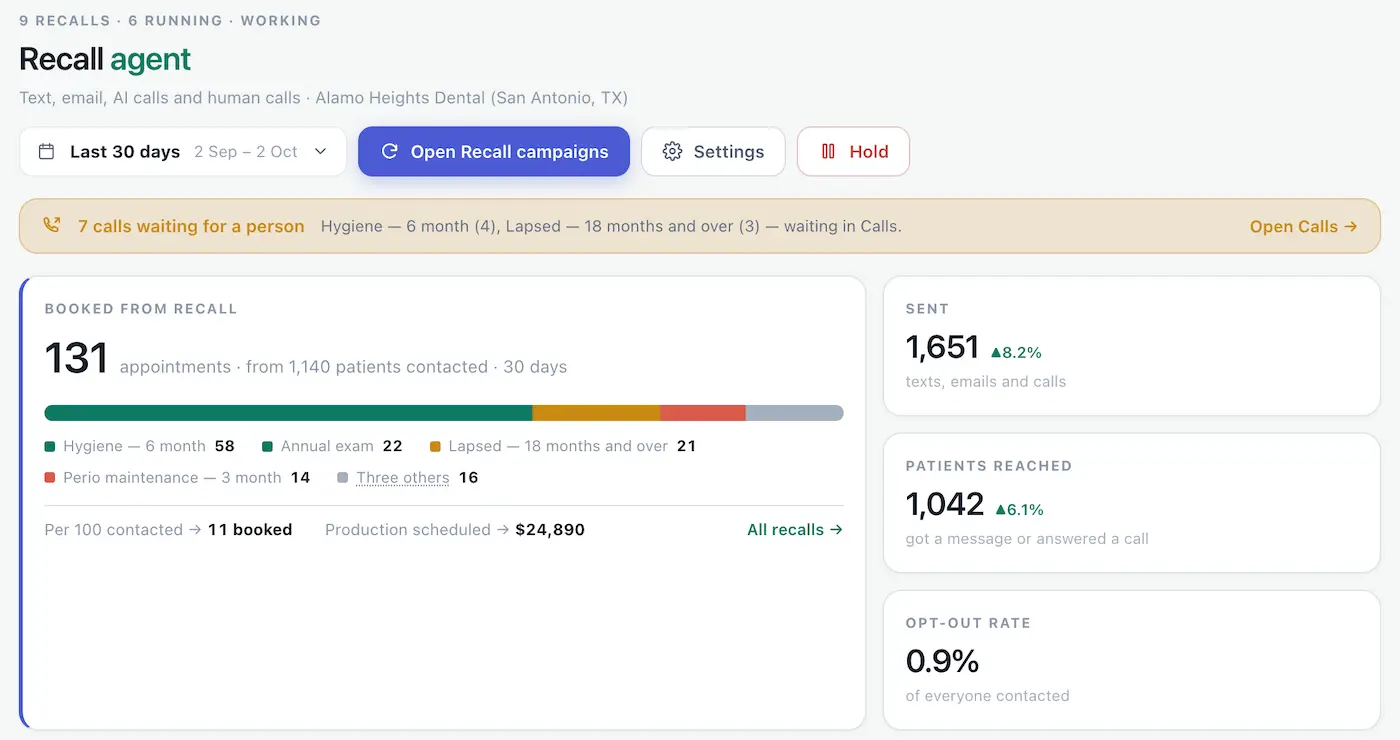
Every night Elva reads your schedule and recall dates and works out who has been gone 18 months or more, who already has an appointment, and who can't be contacted.
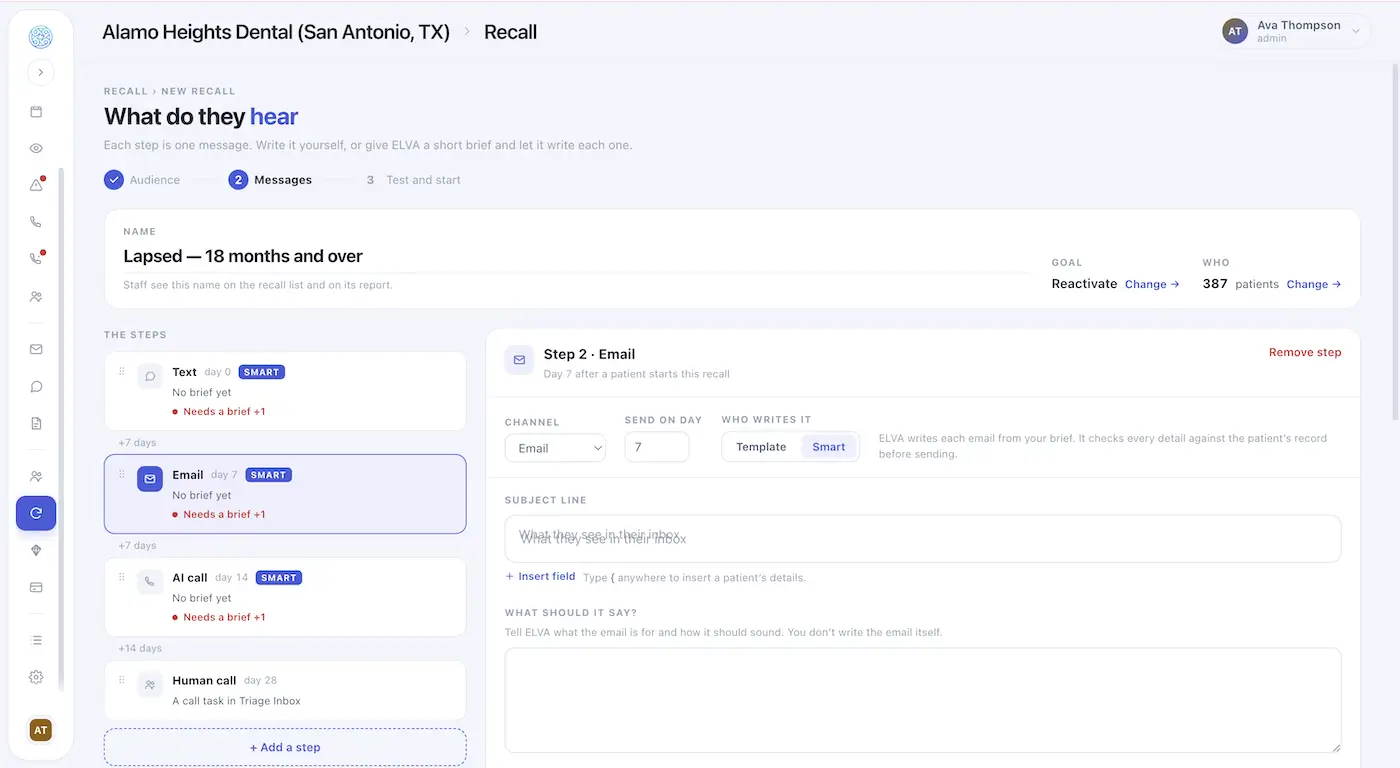
The win-back sequence starts with a text, then an email on day 7, an AI call on day 14 and a call from your team on day 28. Each step goes only to patients who haven't booked.
Patients reply in their own words and their own language. Elva answers, offers times with the right provider and books the visit in the conversation or on the call.
Patients still unbooked reach your Calls page with who to call, why, and what they were already sent. One tap records the outcome, and Elva carries on from there.
Nothing is sent until you press Start. You can pause any recall, or hold all of them at once.
Last visit date — how long each patient has been gone, measured against the 18-month line or the group you describe
Recall dates — read from your schedule every night, so the patient is found when they lapse, not when someone runs a report
Existing appointments — patients who already have a visit booked are left out, and anyone who books stops receiving messages, however they book
Contact details — patients with no mobile number or email are left out and counted, so you can see who the recall can't reach
Opt-outs — patients who opted out are never contacted, and replying STOP ends texts at once
What they're due for — the cleaning, the exam or both, so the message names a real reason to come in
Patient language — you write in English, and each patient reads and hears their own language
Contact limit — a cap on how often any patient hears from the practice, shared across everything Elva sends
Quiet hours — texts and calls go out only inside the hours you set
Other recalls — a patient due for two things can get one message that covers both, not two
Chart facts — every name, date and number in a message is checked against the patient's chart before it sends
Replies — scheduling questions are answered and booked in the conversation, and anything clinical goes to your team
Results — sent, reached, booked and attended, so a visit that doesn't happen isn't counted as a win
That list is the checking most practices do by hand, one patient at a time, when there's time. Elva runs it every night across the whole patient list.
In a 20-minute demo we walk through the reactivation recall that is ready on day one, build a new one from a sentence, and show the messages your patients would get.
Dental patient reactivation software finds patients who haven't visited in 18 months or more, contacts them by text, email and phone, and books them back onto the schedule, so winning back lapsed patients happens every day instead of once a year.
By hand, reactivation means running a report, building a list and making calls whenever the front desk has a quiet week. Patients get one attempt, if that, and the list keeps growing. Software runs the same search every night, follows each patient up on a schedule, and drops anyone who books.
"Inactive" has no single definition. The ADA's records policy treats a patient as inactive after 24 months without dental service, while many practice analytics tools and consultants draw the line at 18 months. Elva starts reactivation at 18 months, and you can describe a different group in your own words.
Reactivation is not a bigger recall list. A patient who has been gone two years does not respond to the same message as one who is due next week, so the wording is warmer, a phone call is part of the sequence, and the goal is to bring the patient back rather than remind them. Patients mid-cycle on hygiene, or with diagnosed treatment they never booked, have their own recalls.
Nobody chooses to leave a dental practice. A patient cancels once, means to rebook, and the months pass. By the time anyone notices, they have been gone longer than a year and the recall list has moved on without them.
Reactivation is a report, a spreadsheet and a stack of calls, and your front desk also has a waiting room to run. So it happens in a quiet week, if at all. Elva covers the follow-up your team can't fit in, every day.
A single voicemail or email is easy to miss. Follow-up is what brings patients back, and it's the step a busy front desk struggles to keep up. Elva follows up by text, email and phone until the patient books or the sequence ends.
A patient who has been gone two years needs a different message from one who is due next week. A cleaning reminder reads like a form letter. A warm note that says it's good to hear from them, and easy to come back, reads like a person. Elva writes each one that way.
Illustration, not a result: a practice has 400 patients gone 18 months or more. If one in ten rebooks, that is 40 patients back in the chair. Multiply by what a returning patient's first visit is worth to your practice. Elva Recall handles every other kind of recall too, from hygiene recall to unused benefits reminders.
Elva runs alongside your practice management system rather than replacing it, with real-time sync across Dentrix, Dentrix Ascend, Open Dental, Eaglesoft, Curve Dental, Denticon, and CareStack.
It reads your schedule and recall dates to find lapsed patients and writes each booking back, so the front desk sees the returning patient on the schedule without re-keying anything.
 Authorized API Partner
 Official API Vendor Partner
Rules you can review. Who is included, how many touches and on which days, and what every message must say are all yours to set. Reports count sent, reached, booked and attended.
Human review where you want it. Read each step as three real patients would get it before anything is sent. Your team takes the personal calls, and on AI calls, whether Elva announces itself as automated is set per practice.
Limits that protect patients. A shared contact cap, quiet hours, and instant opt-out. A patient can stop recall messages and keep their appointment reminders.
Handled to HIPAA standards. Patient data moves under a signed business associate agreement, encrypted at rest and in transit, and messages carry only what's needed to book a visit.
Lost patients are common, and the gap between practices is wide. Levin Group's 30-year study of top-producing practices found annual patient attrition of about 7–9% at the top 10%, against 12–15% at most other practices.
Source: Dr. Roger P. Levin (Levin Group), "Reducing lost dental patients," Dental Products Report, 19 November 2019. Retrieved 5 October 2026.
Persistence matters. Levin Group teaches a nine-week follow-up process and reports that under it the average patient takes 4.1 weeks to schedule, well past the point where a single reminder or one call has been and gone.
Source: Dr. Roger P. Levin (Levin Group), "Reducing lost dental patients," Dental Products Report, 19 November 2019. Retrieved 5 October 2026.
Cost is the barrier patients name most. In CDC survey data for 2024, cost of care was the most common reason adults gave for not visiting a dentist in the past year, even among adults with private dental insurance.
Source: America's Health Rankings (United Health Foundation), "Dental Visit," using CDC Behavioral Risk Factor Surveillance System data, 2024. Retrieved 5 October 2026.
Dental patient reactivation is the process of contacting patients who have stopped coming in and bringing them back for care. It usually targets patients who haven't visited in 18 months or more, using a sequence of texts, emails and calls rather than a single reminder. Elva runs it automatically and books returning patients onto your schedule.
There is no single definition. The ADA's records policy treats a patient as inactive after 24 months without dental service, while many practice analytics tools and consultants use 18 months. Elva starts reactivation at 18 months, and you can describe a different group in your own words, such as patients gone 12 months.
Hygiene recall reaches patients who are due for a cleaning on their regular cycle. Reactivation reaches patients who have been gone 18 months or more, so the message is warmer, a phone call is part of the sequence, and the goal is to bring them back rather than remind them. Both run inside Elva Recall.
Every night Elva reads your schedule and recall dates and works out who has been gone 18 months or more. It leaves out patients who opted out, have no mobile number or email, or already have an appointment. Before you press Start you see how many patients match and the first 20, with the reason each one is on the list.
The win-back sequence starts with a text, then an email on day 7, an AI call on day 14 and a call from your team on day 28. Each step goes only to patients who haven't booked yet. You can change the steps and the days, and edit a recall while it runs without anyone receiving a step twice.
No. Give Elva a short brief on what the message is for and how it should sound, and it writes each patient their own message using what it knows about them, such as how long they've been away. You can also write your own. Every name, date and number is checked against the patient's chart before sending.
Open Dental's Recall List has a Reactivations tab for tracking contact attempts with inactive patients, which gives you a list to work through by hand. Elva reads the same practice data every night, contacts those patients on the days you choose, and writes the bookings back to Open Dental.
Elva syncs in real time with Dentrix, Dentrix Ascend, Open Dental, Eaglesoft, Curve Dental, Denticon, and CareStack. It reads your schedule and recall dates and writes bookings back, so returning patients appear on your schedule without anyone re-keying them.
Replies are answered in the patient's own language at any hour, and Elva offers times with the right provider and books the visit in the conversation. Patients who never respond reach your Calls page at the final step, with who to call, why, and what they were sent. One tap records the outcome: booked, call back, not interested or no answer.
Phone calls are made by the Elva AI Receptionist. Without it, reactivation runs on text and email, and your team makes the calls from the call list. Whether the AI announces itself as automated on a call is configurable per practice.
Elva is built for dental practices and is HIPAA compliant. We sign a business associate agreement with every practice, data is encrypted at rest and in transit, and messages carry only what's needed to book a visit. Patients can stop texts instantly by replying STOP, and can stop recall messages while keeping their appointment reminders.
Most practice management systems include a basic active-or-inactive eligibility check at no extra cost, and payer portals are free to use. What isn't generally free is the depth — network status, code-level frequency limits, downgrades, missing-tooth clauses, coordination of benefits — because that requires pulling from multiple payer sources and interpreting the response. Elva is a paid platform; tell us your practice size and setup and you'll have a quote within 24 hours.
See Elva build a reactivation recall from a sentence, and read the messages your patients would get.